Dataverse Virtual Tables: architecture, trade-offs, and technical implementation guide
A practical guide to Dataverse Virtual Tables, including pros/cons, differences with standard and elastic tables, connector options, ports, and production recommendations.

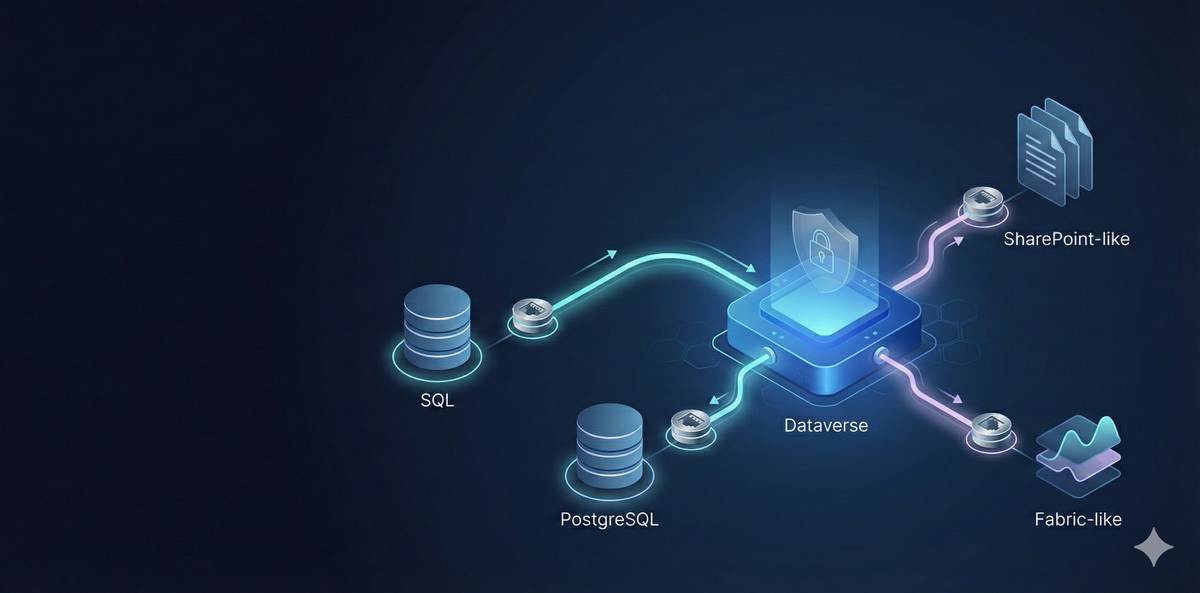
Dataverse Virtual Tables are one of the fastest ways to surface external data in Power Platform without replicating it into Dataverse.
This guide focuses on practical architecture decisions, technical trade-offs, connector options, and implementation recommendations.
What Dataverse Virtual Tables are
A virtual table is a Dataverse table definition that reads rows from an external source at runtime. In model-driven apps it behaves like a Dataverse table, but the data remains in the source system.
Connection options and official documentation
Microsoft documents virtual table support via provider patterns (for example OData v4 provider and custom data providers). In many projects, teams also combine this with connector-based integration patterns to surface external systems.
- Create and edit virtual tables (Microsoft Learn)
- PostgreSQL connector reference
- Custom connectors overview
Common external systems teams usually target include SQL Server, PostgreSQL, SharePoint-backed data, and Microsoft Fabric-adjacent data products, depending on the provider/connector approach and environment constraints.
Pros and cons of Virtual Tables
Pros
- No data duplication by default.
- Faster integration delivery for read-focused use cases.
- Lower Dataverse storage pressure for large external reference datasets.
- Good fit for phased modernization where backend migration is not immediate.
Cons
- Not all Dataverse features are available for virtual tables.
- Runtime performance depends on external source and query design.
- Availability depends on external system uptime and network path.
- Security and ownership models may require extra architecture work.
Standard vs Elastic vs Virtual tables
Standard tables
Best for core transactional business data with full Dataverse behavior, relational depth, and broad platform compatibility.
Elastic tables
Best for high-throughput and large-volume scenarios with scale-first requirements. Great for ingestion-heavy patterns, with specific capability trade-offs.
Virtual tables
Best when source-of-truth must remain external and you need live access in Power Platform experiences.
When Virtual Tables are truly necessary
- Data residency/ownership rules prevent copying into Dataverse.
- Legacy system is still operationally authoritative.
- Near real-time visibility is needed without ETL lag.
- You need app-layer modernization before backend replatforming.
Technical implementation notes
1) Data contract first
Expose stable external views/entities with predictable keys and clean types. Avoid volatile schemas.
2) Query shape matters
Filter and project minimal columns. Slow external queries produce slow app experiences.
3) Ports and connectivity basics
- PostgreSQL commonly uses TCP 5432.
- SQL Server commonly uses TCP 1433.
- OData/HTTP-based providers usually use 443.
- If using private/on-prem data, gateway/network path design is critical.
4) Security recommendations
- Use least-privilege credentials for external reads/writes.
- Prefer encrypted transport (TLS) end to end.
- Do not embed secrets in app code; use managed secret storage.
- Document ownership between Power Platform and data-platform teams.
Practical architecture example: PostgreSQL-backed contact domain
- PostgreSQL remains system of record.
- Expose stable tables/views for contact and interaction entities.
- Map to virtual tables in Dataverse.
- Use model-driven app for operational visibility.
- Keep write-back rules explicit and controlled.
Recommendations before production
- Benchmark list views and filtered queries with realistic volumes.
- Define fallback UX for external downtime.
- Track connector/provider limits and throughput behavior.
- Create a clear runbook for incident triage (source vs Dataverse vs network).
Conclusion
Virtual Tables are not a universal replacement for Dataverse storage. They are an integration strategy. Used in the right place, they reduce duplication and accelerate delivery while keeping source-of-truth where it belongs.
If you want to review your architecture and choose the right table strategy, you can reach me at www.lago.dev.