Power Automate error handling guide: patterns that survive production
A practical, production-focused guide to error handling in Power Automate, including Run after, scopes, retries, logging, and termination patterns.

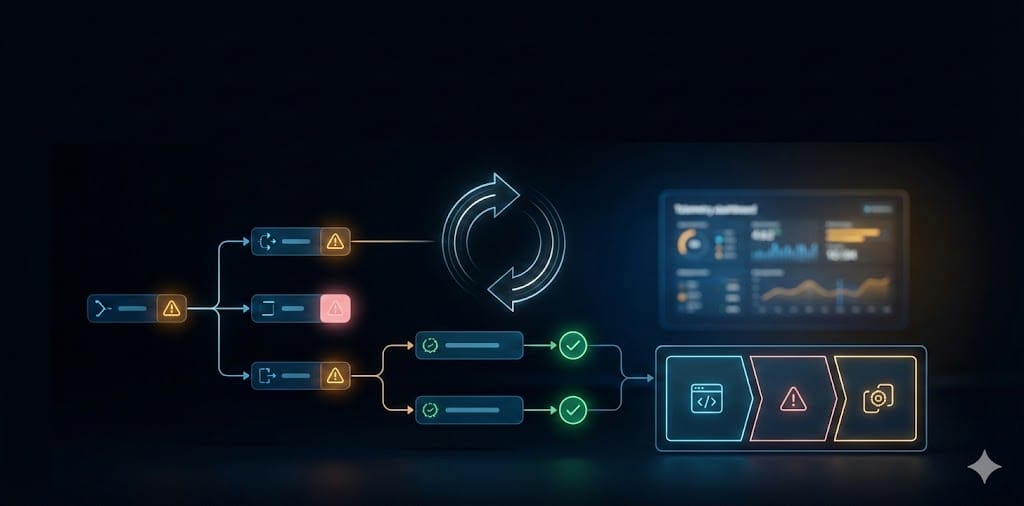
Most Power Automate failures are not connector failures. They are design failures. The flow had no clear fallback path, no useful telemetry, and no safe way to stop execution when things went wrong.
This guide is intentionally practical. It is built for teams who need workflows that survive production traffic and real-world edge cases.
What robust error handling means in real projects
- You classify errors instead of treating all failures the same.
- You retry only transient faults, not business-rule failures.
- You capture run context that helps humans fix issues quickly.
- You fail fast when continuing could damage data consistency.
A production-ready flow pattern
1) Guard clause before heavy logic
Validate required values early and terminate with a meaningful message if the input is not valid.
2) Try/Catch scopes with explicit Run after settings
Main logic in Try, fallback in Catch, optional cleanup in Finally. Keep each scope small and purpose-specific.
3) Retry policy by endpoint behavior
Use exponential retries for temporary service/network failures. Avoid retry loops for deterministic failures like validation or permission errors.
4) Run-level logging with links
Capture the run URL and core metadata so support teams can jump directly into the failed run.
5) Controlled termination
Terminate with explicit status and reason when further execution is unsafe.
Useful expression snippets for cloud flows
Cloud flows use Workflow Definition Language expressions. These snippets are useful in error handling branches and conditions.
@coalesce(triggerBody()?['customerId'], 'UNKNOWN')Why: safe fallback if input is null or empty.
@if(empty(outputs('Get_row')?['body']), 'NOT_FOUND', 'FOUND')Why: normalize branching logic before downstream actions.
@equals(outputs('HTTP')?['statusCode'], 429)Why: detect service protection throttling and route to a backoff branch.
@concat('https://make.powerautomate.com/environments/', body('Parse_JSON')?['tags']?['environmentName'], '/flows/', body('Parse_JSON')?['tags']?['logicAppName'], '/runs/', body('Parse_JSON')?['run']?['name'])Why: include direct run link in notifications.
Power Fx snippets you can reuse around automation apps
If your flow is triggered from Canvas apps or related Power Fx surfaces, these snippets help prevent brittle behavior before data even reaches the flow.
IfError( Value(txtAmount.Text), Blank() )Why: graceful conversion instead of hard failure on invalid numeric input.
Coalesce( Trim(txtEmail.Text), "no-email@contoso.com" )Why: enforce fallback value when users submit blank input.
IfError(
   Patch(Orders, Defaults(Orders), payload),
   Notify("Save failed. Please try again.", NotificationType.Error)
)
Why: block silent failures and provide user-facing feedback.
Concurrency and performance considerations
- Parallel branches are great for independent actions, not dependent ones.
- In
Apply to each, increase concurrency gradually and test endpoint behavior. - Large skipped-action trees in switches are a maintenance tax. Use child flows.
Common anti-patterns I still see
- Catch scope without meaningful context in notifications.
- Retrying 400-level business errors as if they were transient faults.
- Alerting everyone for everything.
- Assuming “Succeeded” means business success rather than technical success.
A practical checklist before go-live
- Can every failure path be explained in one sentence?
- Do critical actions have explicit retry strategy?
- Do alerts include run URL and key business identifiers?
- Do you terminate when state is unsafe?
- Did you test throttling and timeout scenarios?
Conclusion
Great error handling turns automation from “it usually works” into “it is safe to run in production.” That is the difference that stakeholders feel after launch.
If this is a priority in your current project, I am happy to review your approach at www.lago.dev.