Beyond Autocomplete: AI-Assisted Dynamics 365 Development in Visual Studio Code
Build D365 C# plug-ins and JavaScript with AI in VS Code. Learn to use GitHub Copilot, Dataverse MCP, Agent Skills, and testing best practices

How to use AI agents, Dataverse MCP, and custom development instructions to build better C# plug-ins and JavaScript for Dynamics 365.
Ever asked an AI to write a Dynamics 365 plug-in, only to discover that it invented a Dataverse attribute, used the wrong execution stage, or completely ignored the framework your project uses?
Or perhaps you've asked it to generate JavaScript for a model-driven app, and the result looks perfectly reasonable... until you realize it's using Xrm.Page or trying to manipulate the HTML directly.
Sounds familiar?
AI-powered development tools have improved considerably, and GitHub Copilot has become much more than an advanced autocomplete feature.
We can now use AI agents capable of exploring repositories, modifying multiple files, executing commands, and interacting with external systems.
Pretty impressive, right?
But here's something I think is worth emphasizing: the model itself is only part of the equation.
A capable AI model without proper context can generate code that looks correct but doesn't fit our architecture, ignores existing functionality, or makes assumptions about our Dataverse environment.
And in Dynamics 365 development, assumptions can get us into trouble very quickly!
Fortunately, we have several tools that can help address these problems.
By combining Visual Studio Code, GitHub Copilot, custom instructions, Agent Skills, and Dataverse MCP, we can create a development workflow where AI does much more than generate isolated code snippets.
The way I see it, there are three things we need to give an AI agent to make it genuinely useful:
- Context: The requirements, architecture, coding conventions, and information about our Dataverse environment.
- Capabilities: The tools needed to explore the repository, modify files, retrieve metadata, and execute development commands.
- Verification: Tests, compilation, code reviews, and a process for validating the result.
In this article, we'll use those three principles to develop a simple Dynamics 365 feature involving a C# plug-in and JavaScript web resource.
Everything discussed here is based on the tools available as of June 2026.
Let's get started!
AI Development Is No Longer Just Autocomplete
If you've been using GitHub Copilot for a while, you probably remember when its main purpose was suggesting the next few lines of code.
You start writing a method, and Copilot predicts what comes next.
Sometimes it's exactly what you need. Other times, not so much.
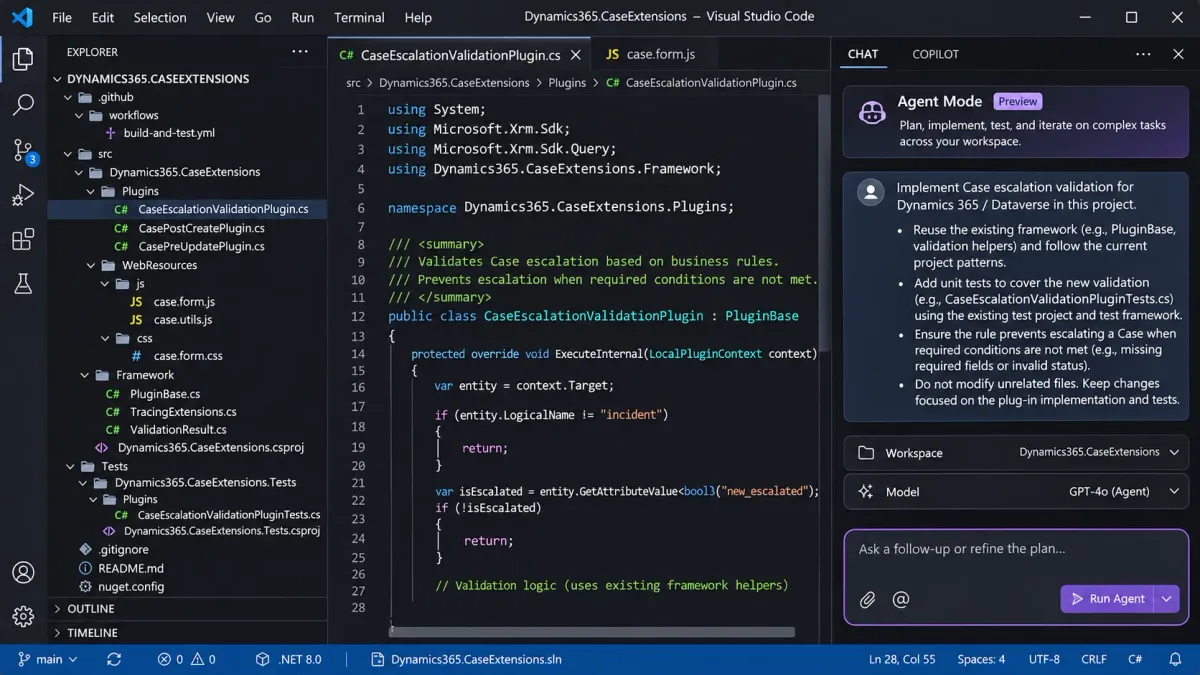
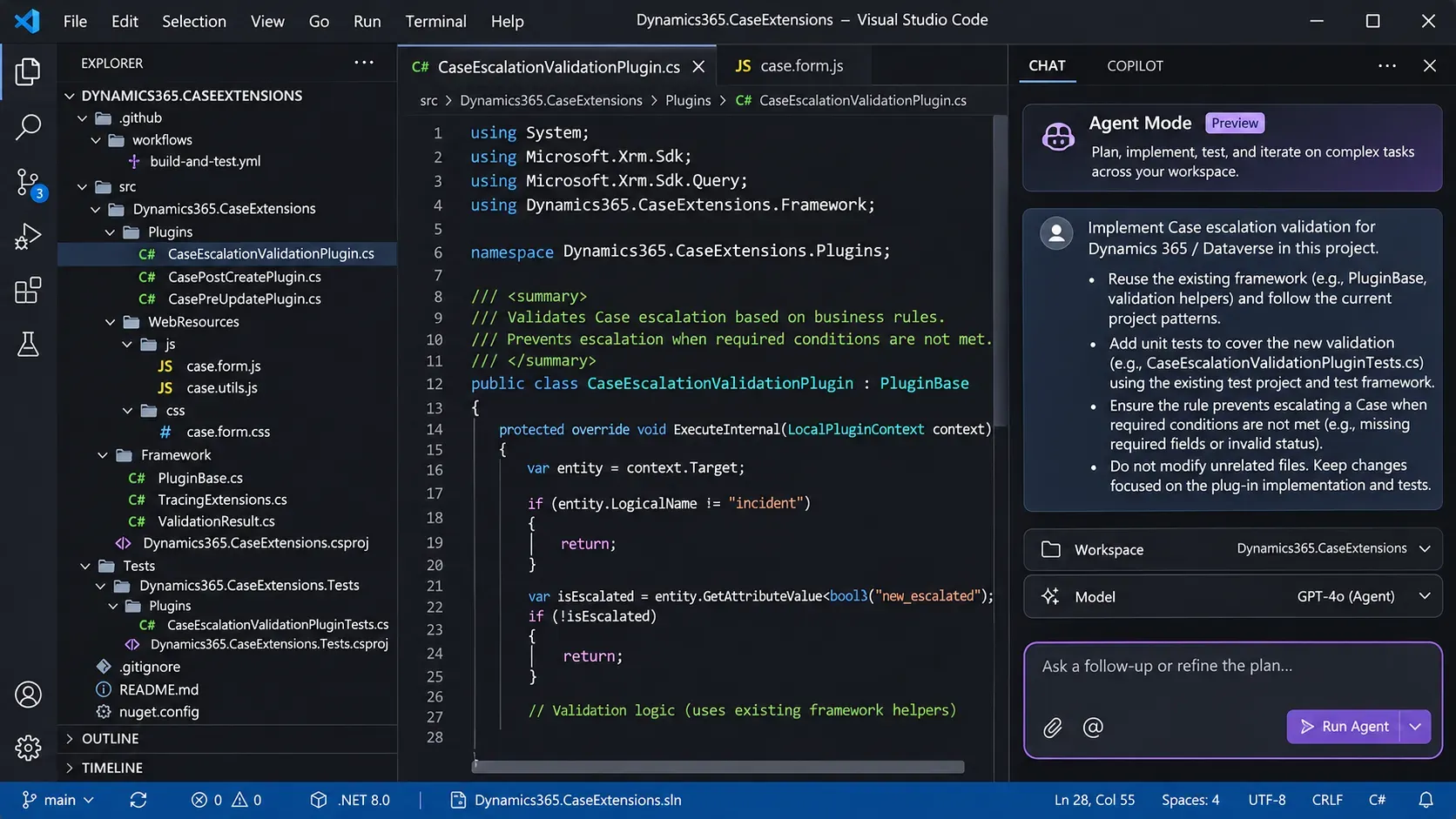
With Agent Mode in Visual Studio Code, however, we can work differently.
Instead of asking the AI to generate a method, we can give it a requirement and let it inspect the project before proposing an implementation.
For example, rather than asking:
Write a C# plug-in that validates a Case.
We could ask:
Review the existing plug-in project and its development conventions.
Implement the Case escalation validation described in the requirements document.
Reuse the existing framework, add unit tests, and verify that the project compiles.
Do not modify unrelated functionality or register anything in Dataverse.
Show me the changes and explain any assumptions you had to make.
The difference might seem small, but it changes how we work.
We're no longer asking for an isolated piece of code that we'll have to integrate manually.
We're asking the agent to work within an existing development project.
Of course, that brings a new challenge.
How does the AI know what our project expects?
How does it know which framework we're using, how we organize our plug-ins, which naming conventions we follow, or which Dataverse attributes actually exist?
Well, that's where we need to help it.
Step 1 — Preparing Visual Studio Code
For this example, we'll use Visual Studio Code and GitHub Copilot.
There are other AI coding agents available, but Copilot is a good starting point because of its integration with VS Code and support for tools, MCP, and custom development instructions.
We'll need a few things:
| Tool | Purpose |
|---|---|
| Visual Studio Code | Development environment |
| GitHub Copilot / Copilot Chat | AI-assisted development and Agent Mode |
| C# extension / C# Dev Kit | C# development and project navigation |
| .NET SDK and appropriate targeting packs | Building and testing plug-in projects |
| Node.js / npm | JavaScript development and testing |
| Git | Source control and code reviews |
Power Platform CLI (pac) | Authentication and development tooling |
| Dataverse development environment | Access to real tables and metadata |
If you're developing traditional Dataverse plug-ins, remember that plug-in assemblies target .NET Framework, not modern .NET.
Dataverse supports plug-in assemblies targeting .NET Framework 4.6.2 through 4.8, with Microsoft recommending 4.8 for new plug-in projects.
For our example, we'll assume a supported .NET Framework 4.8 project.
The exact build setup depends on the repository. SDK-style projects can often be built using dotnet build with the necessary targeting packs, while other projects may require MSBuild and a Windows build environment.
And, of course, we should have a dedicated development environment where we can safely validate our work.
Power Platform CLI
If you already develop for Dynamics 365, you're probably familiar with the Power Platform CLI.
We can authenticate against our development environment:
pac auth create --environment https://contosodev.crm.dynamics.comAnd verify the available authentication profiles:
pac auth listFor plug-in registration, we can launch the Plug-in Registration Tool:
pac tool prtThe Plug-in Registration Tool requires the appropriate Windows and .NET Framework tooling.
We're not going to automate registration in this example, but it's useful to have these tools available.
For now, our objective is to get VS Code ready to work with our source code and provide the AI agent with the right development context.
Step 2 — Let's Give Our AI Something to Work On
Instead of generating unrelated examples, let's use one Dynamics 365 Customer Service requirement.
Imagine we want to improve how support agents handle escalations.
The business requirement is:
When a Case is assigned High Priority, an Escalation Reason must be provided.
Sounds simple enough.
But we have two different responsibilities.
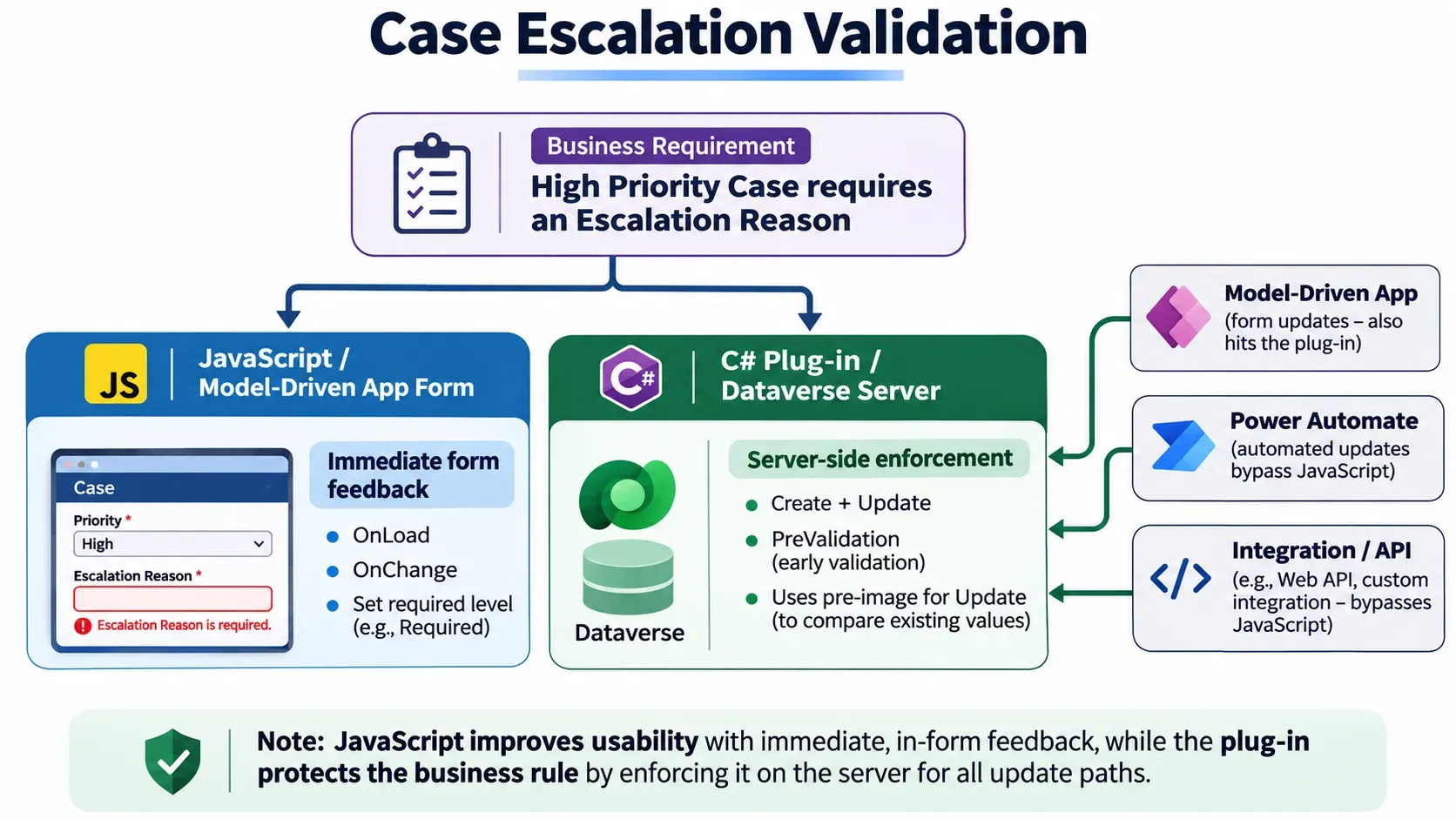
First, we want the user interface to react immediately when the priority changes. The Escalation Reason field should become mandatory, so the user knows they need to complete it.
Second, we must enforce the requirement on the server.
After all, not every Case is updated through a model-driven app.
Records can be created or modified through Power Automate, integrations, the Dataverse Web API, or other processes.
If we only implement the validation in JavaScript, those operations could bypass it.
So, for our example, we'll create:
- A JavaScript web resource that makes the Escalation Reason mandatory on the form when Priority is High.
- A C# plug-in that validates the business rule when a Case is created or updated.
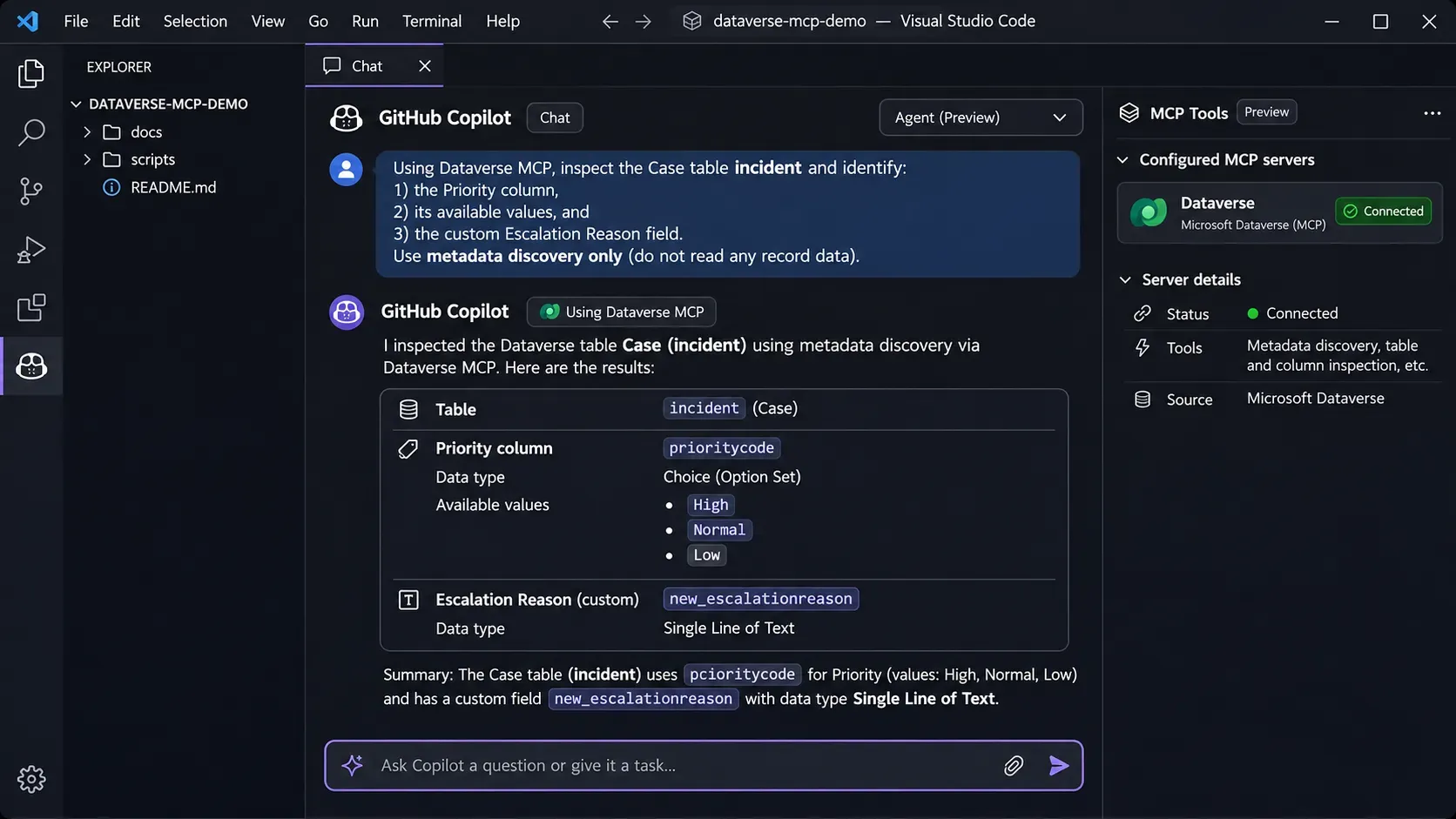
We'll use the standard Case table (incident), its Priority column (prioritycode), and an illustrative custom text column named new_escalationreason.
The custom column is only an example. Your actual environment will probably use a different publisher prefix.
And that's our first opportunity to improve the AI workflow.
Step 3 — Stop Making the AI Guess Your Dataverse Schema
One of the most frustrating problems with AI-generated Dynamics 365 code is that models often make assumptions about our data model.
They know that Dataverse has Accounts, Contacts, Cases, Opportunities, and many other standard tables.
They might even know the logical names of common attributes.
But they don't know which custom attributes exist in our environment.
They also don't necessarily know which choice values, relationships, or customizations we've introduced.
For example, an AI might correctly identify prioritycode as the Case Priority column.
But does it know which numeric value represents High Priority?
And what about our custom Escalation Reason column?
This is where Dataverse MCP becomes particularly interesting.
What Is MCP?
MCP stands for Model Context Protocol.
In simple terms, it's a standard that allows AI applications to interact with external tools and data sources.
Instead of requiring every AI client to implement its own integration with Dataverse, we can use a Dataverse MCP server.
The agent receives tools that allow it to discover metadata, retrieve information, and perform supported operations.
For our purposes, this means the agent can retrieve facts about the actual environment rather than relying entirely on what the model remembers.
In June 2026, Microsoft introduced an updated Dataverse MCP tool structure that made the distinction between metadata discovery and business-data queries clearer.
Some useful tools include:
| Tool | Purpose |
|---|---|
search | Discover tables and other metadata |
describe | Retrieve details about discovered metadata |
read_query | Execute supported read-only Dataverse queries |
search_data | Search Dataverse data, when Dataverse search is enabled |
There are also tools for creating, updating, and deleting records or metadata, subject to the configured environment and permissions.
For development assistance, however, the metadata discovery tools are often all we need.
Connecting Dataverse MCP to VS Code
Before connecting, an administrator must ensure that the Dataverse MCP server is enabled for the development environment and that the GitHub Copilot client is permitted.
Once that's available, open Visual Studio Code.
Open the Command Palette and select:
MCP: Add Server
Choose the HTTP option and provide the Dataverse endpoint.
For example:
https://contosodev.crm.dynamics.com/api/mcpReplace the example URL with the instance URL of your development environment.
We can also configure the server directly in our workspace's .vscode/mcp.json:
{
  "servers": {
    "Dataverse": {
      "type": "http",
      "url": "https://contosodev.crm.dynamics.com/api/mcp"
    }
  }
}
After completing authentication, open Copilot Chat in Agent Mode and verify that the Dataverse tools are available.
And now comes the fun part!
Let the Agent Discover the Metadata
We can start with a prompt like this:
Using Dataverse MCP, inspect the Case (incident) table in our development environment.
Identify the Priority column, its available values, and the logical name and type of the custom Escalation Reason field.
Use metadata discovery only. Do not create, update, or delete records or tables.
Summarize the findings and identify anything that needs clarification before implementation.
The agent can now retrieve the actual metadata.
Instead of inventing attribute names, it has a way to verify them.
This doesn't mean the model will never make mistakes again. It still needs to select the correct tools and interpret their responses.
But we've eliminated an important source of uncertainty.
We've given the agent access to facts instead of asking it to guess.
One important consideration: Dataverse MCP operations still use the environment's security context and may consume Copilot Credits depending on the licensing and operation.
For development, I recommend using a dedicated environment and allowing only the tools necessary for the task.
If we're only inspecting metadata, why would the agent need permission to delete tables or modify business records?
Step 4 — Teaching Copilot How We Develop
Now that Copilot can retrieve our Dataverse metadata, we still have another problem.
It doesn't know how we want our code structured.
For example, one developer might prefer implementing IPlugin directly.
Another might use a custom plug-in base class or a framework providing common services, tracing, and execution-context helpers.
Some projects use early-bound classes, while others use late-bound entities.
And different organizations have different rules for logging, exception handling, dependency injection, and testing.
None of these approaches is universally correct.
But mixing them randomly in the same repository is probably not a good idea.
Repository Instructions
GitHub Copilot supports repository-level custom instructions.
We can create a file named:
.github/copilot-instructions.mdInside it, we define the general rules Copilot should follow when working with our project.
For example:
# Dynamics 365 Development Instructions

## General
- Follow the existing repository architecture.
- Reuse existing utilities and frameworks.
- Do not introduce dependencies without approval.
- Avoid modifying unrelated files.
- Ask questions when requirements are ambiguous.

## Dataverse
- Verify table and attribute names using metadata.
- Do not assume Choice numeric values.
- Do not modify environment data unless requested.

## C# Plug-ins
- Follow the existing plug-in framework.
- Use ITracingService for diagnostic information.
- Prefer pre-images over unnecessary Retrieve operations.
- Handle partial Update targets and null values.
- Add tests for new business logic.

## JavaScript
- Use supported model-driven app Client APIs.
- Use executionContext.getFormContext().
- Avoid Xrm.Page and direct DOM manipulation.
- Handle missing attributes and controls.

## Validation
- Build the affected projects.
- Run the relevant tests.
- Report failures and unverified assumptions.
- Do not deploy changes automatically.
This is just an example, of course.
The important part isn't copying these exact rules.
It's defining the expectations that apply to your own development process.
I would recommend starting with a relatively small set of instructions and expanding it when recurring problems appear.
An enormous instructions file containing hundreds of rules might seem impressive, but it can also create conflicting guidance and unnecessary context.
Different Instructions for Different Languages
We can take this further.
GitHub Copilot supports path-specific instructions, allowing us to define different guidance depending on the files being modified.
For example:
.github/
  copilot-instructions.md
  instructions/
    csharp.instructions.md
    javascript.instructions.md
Our JavaScript instructions might begin with:
---
applyTo: "**/*.js,**/*.ts"
---

# Model-Driven App JavaScript

- Use supported Xrm Client APIs.
- Receive the execution context in event handlers.
- Prefer named functions for form events.
- Keep business logic separate from event registration.
- Test behavior for missing or null field values.
We can create a similar file for C# plug-ins, documenting the framework and testing conventions.
This provides more relevant instructions depending on the technology being used.
And once we have these instructions in Git, the entire team can benefit from them.
Step 5 — Creating Reusable Agent Skills
Repository instructions are useful, but what if we repeatedly perform the same development activities?
For example:
- Creating a new Dataverse plug-in.
- Adding unit tests to an existing plug-in.
- Implementing a model-driven app JavaScript web resource.
- Reviewing code for common Dataverse mistakes.
- Generating technical documentation.
Explaining the entire workflow every time becomes repetitive.
And this is where Agent Skills become interesting.
A skill is a reusable package of instructions that teaches an AI agent how to perform a particular task.
Unlike repository-wide instructions, which provide general guidance, skills describe task-specific workflows.
Visual Studio Code introduced support for Agent Skills in late 2025, and that support was generally available by January 2026.
For example, we could create:
.github/
  skills/
    dataverse-plugin/
      SKILL.md
    form-javascript/
      SKILL.md
    code-review/
      SKILL.md
Each skill contains a SKILL.md file defining its purpose and process.
Creating a Simple Plug-in Skill
Let's imagine we frequently create Dataverse plug-ins.
We could define a reusable skill that guides the agent through the implementation process:
---
name: dataverse-plugin
description: Develop or modify Dataverse C# plug-ins
  using the repository's existing framework and conventions.
---

# Dataverse Plug-in Development

## Workflow

1. Read the repository architecture and conventions.
2. Inspect similar existing implementations.
3. Verify relevant Dataverse metadata.
4. Confirm message, stage, images, and filtering attributes.
5. Identify affected files and propose changes.
6. Implement using the existing framework.
7. Add or update unit tests.
8. Build the affected projects and run relevant tests.
9. Report results and remaining validation.

## Restrictions

- Do not invent Dataverse attribute names.
- Do not introduce a new framework without approval.
- Do not modify unrelated files.
- Do not register or deploy plug-ins automatically.
That's already a useful starting point.
We could make it more sophisticated by including examples, framework documentation, or scripts for testing.
But I wouldn't recommend building an enormous collection of skills on day one.
Start with the tasks you repeat most often.
If you find yourself explaining the same process to the agent over and over, there's probably an opportunity to turn it into a skill.
Instructions, Skills, and MCP: What's the Difference?
These three concepts complement each other, but they serve different purposes.
| Component | Responsibility |
|---|---|
| Instructions | Define how development should be performed |
| Skills | Define the workflow for a recurring task |
| MCP | Give the agent access to external information and capabilities |
For example, our C# instructions tell Copilot to use the existing plug-in framework.
Our plug-in skill tells it how to approach development, testing, and validation.
Dataverse MCP tells it which tables and attributes actually exist.
Combined, they make the agent considerably more informed.
One clarification: Agent Skills stored in our repository are not the same thing as the Dataverse business skills managed through certain Dataverse MCP operations. They have different purposes and lifecycles.
And here's something important.
I wouldn't recommend blindly copying somebody else's complete collection of skills and development rules.
Everybody has a different workflow.
The real value is learning how to build instructions and skills that complement your own development practices.
Step 6 — Developing Our C# Plug-in with AI
Now that we have the requirement, Dataverse metadata, and development conventions, we can finally ask Copilot to implement the server-side validation.
But I wouldn't start by asking it to write everything immediately.
First, I'd ask it to review the requirement and propose an implementation approach.
For example:
Review the Case escalation requirement and the existing plug-in project.
We need server-side validation preventing High Priority Cases from having an empty Escalation Reason.
Use the metadata retrieved from Dataverse MCP and follow our repository instructions.
Before writing code, identify the appropriate messages and execution stages, required images, filtering attributes, Create and Update behavior, and test scenarios.
Do not modify files yet.
Why do this?
Because the plug-in registration is often just as important as the code itself.
A perfectly written plug-in registered on the wrong message or stage isn't going to give us the behavior we expect.
Understanding the Registration
For this requirement, we want to reject invalid operations.
A synchronous PreValidation step is a reasonable default because it can reject an operation before the main database transaction in the normal top-level execution path.
There are caveats when the operation is triggered inside an existing transaction, so the actual execution context still matters.
We also need to handle both Create and Update.
For Create, the Target contains the submitted attributes, but there is no pre-image.
For Update, the Target typically contains only the attributes included in the update request.
This is a detail AI-generated plug-ins frequently get wrong.
The Partial Update Problem
Imagine we have a Case with:
Priority: High
Escalation Reason: Customer requires immediate assistance
Now someone updates only the Escalation Reason, clearing its value.
The Target might contain the Escalation Reason but not the Priority.
If our plug-in checks only the Priority in Target, it could incorrectly allow the update.
The solution is to use the pre-image to obtain values that weren't included in Target.
For example, the essential Update validation could look like this:
const string PriorityColumn = "prioritycode";
const string ReasonColumn = "new_escalationreason";

// Example only: verify the actual choice value in Dataverse.
const int HighPriorityValue = 1;

int? priority = target.Contains(PriorityColumn)
    ? target.GetAttributeValue<OptionSetValue>(
        PriorityColumn)?.Value
    : preImage.GetAttributeValue<OptionSetValue>(
        PriorityColumn)?.Value;

string reason = target.Contains(ReasonColumn)
    ? target.GetAttributeValue<string>(ReasonColumn)
    : preImage.GetAttributeValue<string>(ReasonColumn);

if (priority == HighPriorityValue &&
    string.IsNullOrWhiteSpace(reason))
{
    tracingService.Trace(
        "Case escalation validation failed.");

    throw new InvalidPluginExecutionException(
        "An Escalation Reason is required for High Priority cases.");
}
This is the core validation logic, not a complete plug-in.
It assumes that we've already retrieved the Target, registered and obtained the required pre-image, and initialized tracing.
For Update, the pre-image should contain prioritycode and new_escalationreason.
We should also configure appropriate filtering attributes so the step doesn't execute unnecessarily.
For Create, we need a separate path that evaluates the submitted values and handles any relevant defaulting behavior. We cannot use a pre-image because the record doesn't exist yet.
The complete implementation should cover both messages.
And we need to verify that the choice value and custom column name actually match our environment.
What About Existing Frameworks?
This is another area where custom instructions become valuable.
If your project already has a base class that manages execution context, tracing, and organization services, the AI shouldn't introduce an entirely different structure.
We should tell it to reuse the framework.
Better yet, provide examples of existing plug-ins built using that framework.
The agent can inspect those implementations and follow the same pattern.
This is generally much more useful than asking it to invent a new architecture for every requirement.
Step 7 — Creating the JavaScript Web Resource
Now let's move to the user interface.
We want the Escalation Reason field to become mandatory whenever the user selects High Priority.
This is a fairly straightforward piece of JavaScript.
But again, we want to make sure the AI uses the supported model-driven app Client API.
Let's give Copilot a focused prompt:
Create a JavaScript web resource for the Case form.
When Priority is High, make the Escalation Reason column required.
Otherwise, return it to its normal optional state.
The function must work on Form OnLoad and Priority OnChange.
UseexecutionContext.getFormContext()and the field names confirmed through Dataverse MCP.
Handle missing attributes safely and follow our JavaScript instructions.
Do not register or deploy the script yet.
The generated code might look something like this:
var CaseEscalation = CaseEscalation || {};

CaseEscalation.updateRequirement = function (executionContext) {
    const formContext = executionContext.getFormContext();

    const priority = formContext.getAttribute("prioritycode");
    const reason = formContext.getAttribute("new_escalationreason");

    if (!priority || !reason) {
        return;
    }

    // Example only: verify the actual Dataverse choice value.
    const highPriorityValue = 1;

    const isHighPriority =
        priority.getValue() === highPriorityValue;

    reason.setRequiredLevel(
        isHighPriority ? "required" : "none"
    );
};
The implementation is quite simple.
We retrieve the form context, obtain the relevant attributes, check the selected Priority, and update the required level.
We can register CaseEscalation.updateRequirement on the form's OnLoad event and the Priority column's OnChange event.
Remember to enable Pass execution context as first parameter when registering the handlers.
For this example, we're assuming the Escalation Reason column is optional at the Dataverse schema level and becomes conditionally required through our form logic.
If the underlying column is required by the schema, setting the form requirement to none won't override that server-side requirement.
Why Do We Still Need the Plug-in?
Because JavaScript controls the form experience, not every operation against Dataverse.
If a Case is created or updated through an integration or API, the form handler won't execute.
The plug-in is responsible for enforcing the requirement independently of the user interface.
Both components have a purpose.
The JavaScript improves usability.
The plug-in protects the business rule.
This is a good example of why we shouldn't let the AI decide the entire architecture just because it can generate both languages.
Step 8 — Testing What AI Generates
Now let's address one of the most important parts of AI-assisted development.
Just because code compiles doesn't mean it works correctly.
And just because the AI says the implementation is correct doesn't mean we should believe it.
This is particularly important in Dynamics 365, where functionality often depends on platform-specific behavior.
Testing Our C# Plug-in
For the escalation example, I would want tests covering at least the following:
| Scenario | Expected result |
|---|---|
| Create a High Priority Case without a reason | Validation fails |
| Create a High Priority Case with a reason | Validation succeeds |
| Change an existing Case to High without a reason | Validation fails |
| Change an existing Case to High with a reason | Validation succeeds |
| Clear the reason on an existing High Priority Case | Validation fails |
| Update only the Escalation Reason | Pre-image supplies the effective Priority |
| Change Priority from High to Normal | Validation succeeds |
| Submit an unrelated update | No unnecessary validation failure |
These tests should follow the existing project's testing approach.
Depending on the framework, that might involve mocked execution contexts, fake organization services, or other test utilities.
Once the implementation is ready, the agent can execute the relevant build and test commands.
For example, in an appropriately configured SDK-style project:
dotnet build
dotnet test
For other .NET Framework project structures, we might need MSBuild and the corresponding test runner.
If the build fails, we can allow the agent to inspect compiler errors and attempt to correct the implementation.
That's one of the most useful parts of agent-based development.
Instead of receiving code and manually fixing every syntax or compilation issue, we can give the agent access to validation tools.
But there is an important limitation.
If the AI misunderstood the requirement and generated tests based on the same misunderstanding, those tests might all pass.
This is why we should define acceptance criteria independently of the implementation.
Testing JavaScript
The same principle applies to our web resource.
We should verify that the field becomes required when Priority is High, becomes optional otherwise, and doesn't throw errors when an expected attribute is missing.
With an appropriate JavaScript testing setup, we can mock the supported form context methods and validate the handler.
But automated tests are not a replacement for testing the behavior in the actual model-driven app.
We still need to verify the event registrations, form configuration, and interactions with other scripts or business rules.
And for our plug-in, we must validate the real Dataverse registration and execution behavior.
The objective isn't to remove the developer from testing. It's to catch more problems before manual and user acceptance testing begins.
Step 9 — Git, Code Reviews, and the Development Workflow
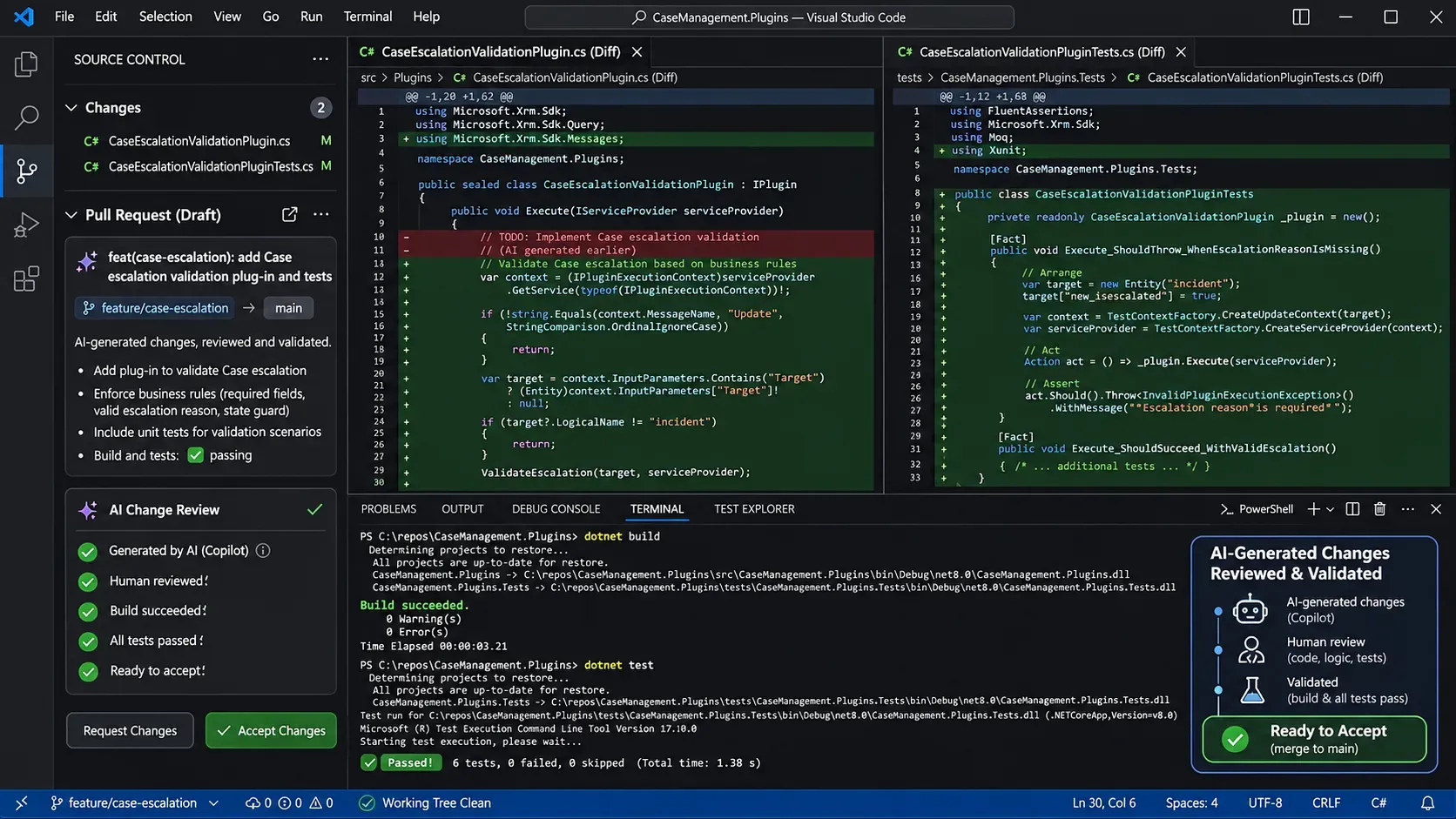
One of the easiest mistakes to make with AI agents is allowing them to modify large portions of the project without properly reviewing the changes.
It's tempting.
We give the agent a requirement, it works for a few minutes, and suddenly we have several modified files and a message saying everything is complete.
Fantastic!
But what exactly changed?
Did it modify an existing method used by other components?
Did it introduce unnecessary dependencies?
Did it duplicate something that was already implemented?
This is why I recommend keeping the normal development workflow.
Create a branch for the feature:
git switch -c feature/case-escalationLet the agent implement a focused change.
Review the result:
git diff
git status
Run the relevant checks and commit once the implementation has been approved.
For larger requirements, it's useful to split the work into smaller changes. One change might implement the C# validation, another the tests, and another the JavaScript behavior.
This makes the code easier to review and gives us reliable recovery points.
AI should work within our development process, not replace it.
And I wouldn't give it unrestricted permission to register plug-ins or modify production environments.
The agent can help prepare artifacts, explain deployment requirements, or inspect configuration.
But actual registration, environment changes, and deployment should follow the organization's ALM process.
What Can Still Go Wrong?
We've covered several improvements.
We have an agent capable of exploring the repository, instructions defining our development conventions, skills describing recurring tasks, and Dataverse MCP providing actual environment metadata.
Does that mean we can now let AI develop everything independently?
Well, not quite.
There are still limitations worth remembering.
Architectural Decisions
Even capable models can propose solutions that aren't appropriate for our environment.
For example, an AI might suggest retrieving a Dataverse record inside a plug-in when the required information is already available through an entity image.
Or it might recommend implementing an important server-side business rule exclusively in JavaScript.
These aren't necessarily syntax errors. They're architectural decisions with consequences for performance, security, and maintainability.
Incorrect Tool Usage
An agent with Dataverse MCP can retrieve real metadata, but it can still misunderstand the results or select an inappropriate tool.
Access to tools doesn't guarantee correct use.
That's why we should restrict permissions and review important findings.
Missing Business Context
A field might be technically optional in Dataverse but mandatory under specific business conditions.
A plug-in might need to behave differently depending on the operation, the user, or the current business process.
Those requirements aren't always visible in metadata.
The AI needs them to be documented or explained.
And finally, there's the question of ownership.
If AI writes the code, who's responsible when something breaks?
The answer hasn't changed.
We are.
As developers, we still own the architecture, the code we approve, and the functionality we deploy.
So, Is It Worth It?
Absolutely. But perhaps not for the reasons people initially expect.
The biggest advantage I see in AI-assisted development isn't necessarily writing a method faster.
It's reducing the amount of repetitive work involved in implementing, understanding, testing, and maintaining functionality.
An AI agent can help us explore unfamiliar parts of a repository.
It can identify existing implementations, generate boilerplate, propose tests, and explain complicated code.
With Dataverse MCP, it can verify real environment metadata instead of forcing us to manually provide every table and column definition.
And with custom instructions and skills, we can make its behavior more consistent with our development practices.
Of course, setting everything up requires some initial effort.
We need to establish conventions, configure tools, define instructions, and create useful skills.
But once those foundations exist, we can reuse them across multiple projects and development tasks.
And the more frequently we perform those tasks, the more valuable that consistency becomes.
In Summary
AI-assisted development has moved well beyond autocomplete.
With Visual Studio Code, GitHub Copilot, Dataverse MCP, and custom development instructions, we now have the tools to create coding agents that understand much more about our projects and the environments we're developing for.
And when working with Dynamics 365, that additional context makes a significant difference.
Instead of repeatedly asking AI to generate isolated pieces of code, we can establish a development workflow where the agent understands our conventions, verifies Dataverse metadata, implements focused changes, and validates its work.
But perhaps the most important lesson is that better AI development doesn't come exclusively from using a better model. It also comes from giving the model better information, better tools, and a better process.
And that brings us to an interesting question.
Everything we've covered so far works regardless of whether the AI model runs in the cloud or on our own hardware.
Once we have a repeatable development workflow, do we really need a frontier cloud model for every code change, test failure, and refactoring task?
In Part 2 — Local Brains, Cloud Strategy, we'll explore how to use locally hosted models for Dynamics 365 development, when it makes sense to involve more capable cloud models, and how to structure development to compensate for the limitations of smaller models.
Because maybe the next improvement isn't simply using a more powerful AI.
Maybe it's learning how to use the tools we already have more effectively.
Happy coding!
Further Reading
Microsoft documentation
- Connect to Dataverse with Model Context Protocol
- Connect Dataverse MCP to GitHub Copilot in VS Code
- Use Custom Instructions in Visual Studio Code
- Use Agent Skills in Visual Studio Code
- Write a Dataverse Plug-in
- Register a Dataverse Plug-in
- Model-Driven App Client API Reference
On That's a Good Question