Local Brains, Cloud Strategy: Building Dynamics 365 with Hybrid AI Agents
Explore local and hybrid AI development for Dynamics 365 in VS Code. Learn about coding agents, model choices, custom skills, testing, and cost savings.

How to combine local AI models, Visual Studio Code, specialized skills, and frontier cloud models to make Dynamics 365 development more efficient, predictable, and potentially less expensive.
I've been thinking about something interesting when working with AI coding agents.
Do we really need the most powerful AI model available to write every line of code?
Think about it.
When developing a Dynamics 365 solution, we spend time making architectural decisions, understanding requirements, identifying dependencies, implementing functionality, fixing compilation errors, writing tests, and maintaining existing code.
Not all of those activities require the same level of reasoning.
Designing an integration architecture involving Dataverse, Azure Logic Apps, and several external systems is very different from implementing a C# method based on an already approved specification.
So, why should we treat both tasks the same way?
In Beyond Autocomplete: AI-Assisted Dynamics 365 Development in Visual Studio Code, we explored how to give coding agents the context, development instructions, Dataverse metadata, and validation tools they need to work effectively.
But there's something interesting about that approach.
Once we have defined the architecture, established our coding conventions, and provided the tools needed to validate the implementation, we've already removed a considerable amount of uncertainty from the development process.
And that opens up another possibility.
What if we could let a locally hosted AI model handle much of the implementation, while reserving frontier cloud models for the tasks that actually need their stronger reasoning capabilities?
This is something I've become increasingly interested in.
Instead of relying exclusively on cloud AI, we can run models on our own hardware and connect them to Visual Studio Code, GitHub Copilot Chat, or other coding agents.
And with the right development workflow, local models can become surprisingly useful.
Of course, there is a catch.
Local models have limitations. Sometimes significant ones.
They might struggle with complex reasoning, misunderstand a large repository, make mistakes when modifying several files, or become confused during long development sessions.
And simply giving them a better prompt won't magically solve everything.
But I believe we can compensate for many of these weaknesses by changing how we work with them.
In this article, we'll explore how to use local and hybrid AI workflows for Dynamics 365 and Power Platform development, particularly when working with C# plug-ins and JavaScript.
We'll focus on the development workflow, not on how to install inference servers or configure GPU drivers. That deserves an article of its own!
Everything discussed here is based on the tools and models available as of June 2026.
Let's get started!
Why Would We Want to Run AI Locally?
Before we start configuring anything, let's address the obvious question.
Why bother?
We already have GitHub Copilot and several excellent frontier models available through cloud services.
They're powerful, convenient, and generally require very little infrastructure on our side.
Why introduce the complexity of running a model locally?
Well, there are a few reasons.
Cost
This is probably one of the most interesting ones, particularly if you're using AI agents extensively.
Traditional autocomplete generates relatively small responses.
An AI coding agent is a different story.
It might inspect dozens of files, execute commands, analyze compiler errors, modify the implementation, run tests, and repeat the process several times.
Every interaction can involve a considerable amount of context.
When using a cloud provider, that means consuming tokens or AI credits.
With local inference, we don't pay a provider for every generated token.
Of course, local AI isn't free.
We need hardware, electricity, storage, and some time to configure and maintain everything.
But once the infrastructure is available, generating additional tokens doesn't normally introduce the same per-token provider charges.
For developers who use AI agents throughout the day, this can make local inference attractive.
Control
Running the model locally gives us more control over which models and versions we use, how they're configured, and where the inference happens.
We can experiment with different models, adjust context sizes, and choose configurations that work well with our development tools.
We also have more control over the information sent to the model.
But be careful here.
Local inference doesn't automatically mean that your entire development workflow is offline or private.
If the agent uses Dataverse MCP, it still communicates with your Power Platform environment.
If it uses a cloud model for planning or review, whatever information we provide to that model leaves our local inference boundary.
Other tools and services may introduce additional connections.
We still need to understand where our data goes and follow our organization's security policies.
Flexibility
Another advantage is being able to experiment without depending entirely on a particular cloud provider.
Open-weight models have improved considerably, and tools like Ollama and LM Studio make them accessible to developers with suitable hardware.
But the biggest advantage, in my opinion, isn't simply having a model running on our workstation.
It's being able to decide which tasks we want to delegate to which model.
And that leads us to the hybrid approach.
Cloud, Local, or Hybrid?
There are three main approaches we can take.
| Approach | Advantages | Disadvantages |
|---|---|---|
| Cloud-only | Simple setup, strong reasoning, generally reliable tool use | Variable inference costs, provider dependency, external data processing |
| Local-only | More control over inference, no per-token provider charges, flexible experimentation | Hardware requirements, maintenance, model limitations |
| Hybrid | Can reserve expensive reasoning for difficult tasks while running repetitive implementation locally | More moving parts, handoff overhead, requires a disciplined workflow |
The hybrid approach is the one I find particularly interesting.
Instead of asking one model to do everything, we distribute responsibilities.
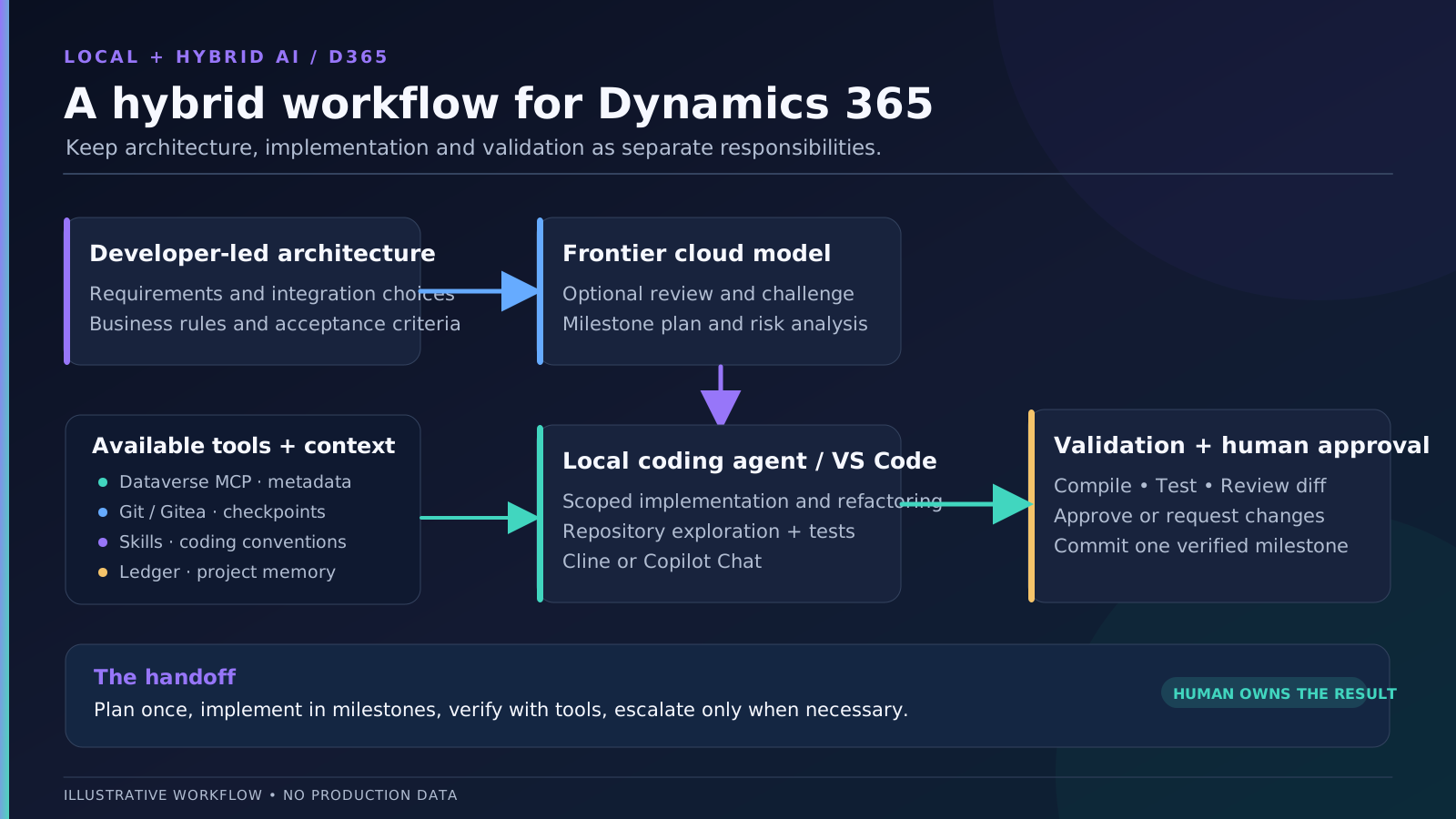
For example, a developer defines the architecture.
A frontier cloud model reviews it and creates the development plan.
A local model implements individual milestones.
Automated tools compile and test the results.
And the developer reviews and approves the implementation.
The cloud model handles activities where its reasoning capabilities are particularly valuable.
The local model handles a significant part of the implementation work.
And our development tools provide objective feedback.
This can potentially deliver results comparable to a cloud-only workflow for well-defined tasks, while reducing the amount of expensive cloud inference required.
But notice the important word: potentially.
A hybrid setup isn't automatically better, cheaper, or faster.
If we spend hours correcting poor local implementations, the savings can disappear quickly.
And if every milestone requires the cloud model to rescue the local agent, we haven't reduced our dependency very much.
The trick is understanding what each model can do reliably.
Connecting a Local Model to Visual Studio Code
Let's assume we've already installed a local model using Ollama, LM Studio, or another inference runtime.
How do we use it for development?
The good news is that we don't necessarily need to change our entire development environment.
Many local inference servers expose APIs compatible with common AI provider formats.
This allows tools that support OpenAI-compatible endpoints to communicate with local models without needing a dedicated integration for every inference engine.
For example, Ollama can expose an endpoint such as:
http://localhost:11434/v1
And LM Studio commonly uses:
http://localhost:1234/v1
These are typical local addresses. Your configuration might be different.
The important part is having an endpoint that our coding agent can access.
Option 1 — GitHub Copilot Chat
As of May 2026, Visual Studio Code supports Custom Endpoint models through its stable Bring Your Own Key functionality.
This means we can connect compatible self-hosted models to Copilot Chat.
Open the Command Palette and select:
Chat: Manage Language Models
From there, add a model using the supported Ollama provider or the Custom Endpoint provider.
For a custom endpoint, we configure the API type, endpoint, model identifier, and authentication information where required.
Depending on the endpoint, we may need to provide the complete Chat Completions or Responses URL rather than just the server root.
Once configured, the model becomes available through the model picker.
We can use it for chat and agent workflows, provided that the model supports the required capabilities.
However, BYOK doesn't automatically replace every GitHub Copilot feature.
For example, inline suggestions and next-edit suggestions have separate requirements.
So don't assume that connecting a local model means every Copilot feature is now running locally.
Option 2 — Cline
Another interesting option is Cline.
Cline is an AI coding agent available as a Visual Studio Code extension.
It supports multiple AI providers, including locally hosted models and OpenAI-compatible endpoints.
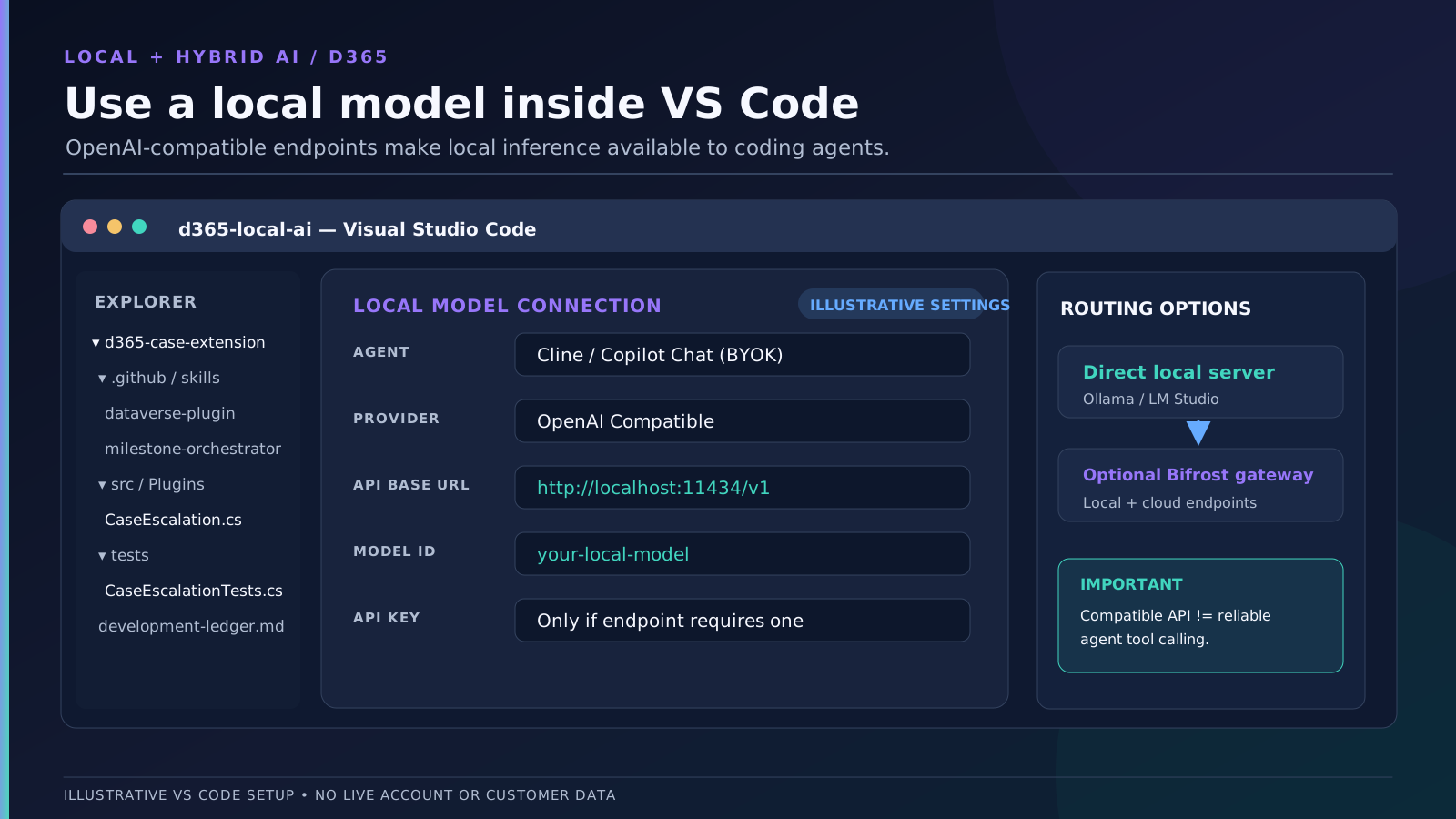
To connect a compatible inference server, open Cline's settings and select OpenAI Compatible as the provider.
Then configure something similar to:
API Provider: OpenAI Compatible
Base URL:     http://localhost:11434/v1
Model ID:     <your-local-model-id>
API Key:      <if required by the endpoint>
The model identifier must match the model exposed by the inference server.
Cline can then use that model for development activities such as reading files, modifying code, and executing commands.
But remember that not every model supports the tool-calling behavior a coding agent requires.
A model might produce excellent code when given a direct prompt but struggle when it needs to select tools, format arguments, or recover from errors.
We'll return to that limitation shortly.
Option 3 — Introducing an AI Gateway
Now, what if we want to use several models?
Perhaps we have two local models, an OpenAI model, and a Claude model.
We could configure each one separately.
But another possibility is introducing an AI gateway.
One interesting option is Bifrost, an open-source gateway developed by Maxim AI.
It provides a common API interface for accessing supported AI providers.
Our architecture could look like this:
Visual Studio Code
        |
        v
Copilot Chat / Cline
        |
        v
   Bifrost Gateway
        |
        +---- Local Model A
        |
        +---- Local Model B
        |
        +---- Cloud Model
This can simplify configurations when experimenting with multiple backends.
But there's an important distinction.
Bifrost is a gateway, not the developer or architectural decision-maker.
Providing access to different models doesn't automatically mean the system knows which one should design the architecture and which one should write the code.
We still need to define how tasks are distributed.
And for a simple local setup, I would start by connecting VS Code directly to the inference server.
Only introduce a gateway when it solves an actual problem.
There's no reason to add unnecessary infrastructure just because we can.
The Elephant in the Room: Local Models Have Limitations
So far, everything sounds great.
We have our local model running, VS Code can communicate with it, and we can start asking it to develop Dynamics 365 functionality.
Problem solved?
Not exactly.
In fact, this is where things become interesting.
Local models can be very capable, but smaller models often struggle with tasks that frontier cloud models handle more reliably.
And pretending otherwise would be a mistake.
The important question isn't simply what are their weaknesses?
It's which weaknesses can we compensate for through better development practices, and which ones do we have to accept?
| Weakness | What can help | What remains difficult |
|---|---|---|
| Complex architecture and reasoning | Developer-approved architecture, frontier-assisted review | Novel problems requiring deep reasoning |
| Long-term planning | Approved implementation plan, small milestones | Complex dependencies and unexpected changes |
| Limited context | Selective repository exploration, documentation, fresh sessions | Changes requiring broad simultaneous understanding |
| Multi-file changes | Specialized skills, focused scope, Git checkpoints | Large interconnected refactoring |
| Unreliable tool calling | Compatible agent/runtime, limited tool sets, explicit instructions | Models that struggle with structured tool use |
| Incorrect code | Real metadata, conventions, compilation, tests | Semantic bugs and unrecognized edge cases |
| Limited hardware | Quantization, context management, suitable model sizes | Physical memory, throughput and latency constraints |
This distinction matters.
We can improve the first part of many of these problems.
But we cannot eliminate the underlying limitations of the model.
Complex Reasoning Is Still Complex
Suppose we ask a local model to design an integration between Dynamics 365, Azure Logic Apps, and an external ERP.
The solution needs authentication, retries, transaction handling, duplicate prevention, logging, and error recovery.
That's a lot of architectural decisions.
A smaller model might produce a convincing diagram but miss important details.
For example, it might suggest making a synchronous Dataverse plug-in wait for an external process that could take several minutes.
Or it might ignore idempotency and duplicate processing.
Those aren't necessarily problems that disappear when we write better prompts.
Sometimes we need a more capable model.
And sometimes we need to make those decisions ourselves.
Large Repositories Are Difficult
Another common problem is understanding existing projects.
Imagine a solution containing several plug-in assemblies, shared libraries, JavaScript resources, unit tests, and integration components.
The agent needs to understand the existing architecture before modifying anything.
A model with limited context might miss dependencies, forget previous findings, or modify the wrong component.
A larger advertised context window doesn't automatically solve the issue.
Using that context still consumes memory and processing resources.
And even when everything fits, the model may not reason reliably about all the information at once.
Tool Calling Matters More Than You Might Expect
A coding agent needs more than the ability to generate code.
It needs to know when to search files, read documentation, execute a command, or inspect compiler errors.
Some models generate excellent standalone code but struggle with structured tool calls.
They might select the wrong tool, provide invalid arguments, or repeatedly attempt an action that has already failed.
Better instructions can help.
But they won't magically give a model tool-calling capabilities it doesn't have.
Code Quality Is Not Just Compilation
Finally, there's code quality.
A local model might generate code that compiles and passes tests but introduces unnecessary abstractions, duplicates existing logic, or ignores established conventions.
Of course, frontier models can make those mistakes too!
The difference is that smaller models may need more explicit guidance and tighter task boundaries.
So, what can we do about all of this?
Well, quite a lot, actually.
The First Trick: Don't Ask the Model to Invent the Architecture
This is probably the biggest change I would recommend.
When working with AI, there are different ways to approach architecture.
Some developers prefer starting with an idea and asking the model to help define the solution.
The model asks questions, identifies missing requirements, proposes alternatives, and eventually produces an architecture.
That can be a perfectly valid workflow.
In fact, we can create a specialized Agent Skill that guides the model through that discovery process.
But personally, I prefer to define the architecture myself.
I want to decide how the components interact, which frameworks we're using, and where the responsibilities belong.
Once the architecture is defined, I can ask a frontier model to review it and identify potential problems.
It can also help turn the architecture into a structured development plan.
Then the local model receives a much simpler responsibility:
Implement the approved design.
This is an important distinction.
If we ask a smaller model to decide everything, it needs to handle architecture, implementation, testing, and debugging simultaneously.
But if we already provide the architecture, the model can concentrate on a more constrained problem.
Let's return to the Case escalation requirement from Part 1.
We've already decided:
- A C# plug-in enforces the business rule.
- JavaScript provides immediate feedback on the Case form.
- Dataverse MCP is used to verify metadata.
- The existing plug-in framework must be reused.
- Automated tests cover the important business scenarios.
- Registration and deployment are handled separately.
We've removed a considerable amount of uncertainty.
The local model doesn't need to decide whether to use JavaScript, a plug-in, Power Automate, or a business rule.
It needs to implement the component we've assigned to it.
This doesn't make the model more intelligent.
It makes the task more manageable.
Let a Frontier Model Create the Development Plan
Even when we define the architecture ourselves, creating a good implementation plan takes some effort.
We need to identify components, dependencies, implementation order, and validation criteria.
This is an excellent task for a capable cloud model.
For example:
Review the approved architecture for the Case escalation functionality.
Create an implementation plan divided into small, independently verifiable milestones.
Each milestone must define its objective, affected components, prerequisites, acceptance criteria, and validation steps.
Do not redesign the architecture. Identify missing information or contradictions rather than making assumptions.
Prepare the plan for implementation by a local coding agent.
The resulting plan might look like this:
| Milestone | Objective |
|---|---|
| M01 | Inspect the repository and identify relevant components |
| M02 | Implement the C# plug-in validation |
| M03 | Add and execute plug-in unit tests |
| M04 | Implement the JavaScript form behavior |
| M05 | Add JavaScript tests |
| M06 | Prepare registration and integration validation |
Now we have something concrete.
Instead of giving the local model the entire requirement and hoping it figures everything out, we can assign one milestone at a time.
There's another advantage.
We don't need to repeatedly call the frontier model during every implementation step.
Once the plan is approved, the local agent can use it throughout development.
We can bring the cloud model back when we encounter a difficult problem, an architectural uncertainty, or a situation requiring broader reasoning.
This is where the hybrid approach starts making economic sense.
We're reserving expensive reasoning for the activities where it has the most value.
Give the Local Model Better Tools
One of the biggest mistakes we can make is expecting the model to understand a large repository simply because it has access to the files.
Access and understanding are not the same thing.
A good coding agent needs a reliable way to explore the project.
And this becomes particularly important when working with local models.
Repository Exploration
Suppose we ask the model to implement a new plug-in.
Before writing anything, it should understand the existing project.
Where are the plug-in classes?
Which framework does the repository use?
Where are the unit tests?
Are there existing implementations of similar business rules?
Does the project use early-bound entities or late-bound attributes?
Instead of loading every file into context, the agent should search for relevant information.
Tools such as file search, ripgrep, Git, and language-aware code navigation can help.
For example:
rg "IPlugin|PluginBase" --glob "*.cs"

rg "InvalidPluginExecutionException" --glob "*.cs"

rg "Escalation" --glob "*.cs"
These searches help the agent identify relevant files before opening them.
We can also give it access to a repository-exploration skill that defines how to approach unfamiliar projects.
The skill might instruct the agent to read the architecture, identify relevant projects, search for similar implementations, inspect only necessary files, and propose changes before editing.
The goal isn't to load everything into context.
It's to retrieve the smallest amount of information needed to implement the task correctly.
Dataverse MCP
Dataverse MCP is another useful tool.
As we covered in Part 1, it allows agents to discover actual Dataverse metadata rather than inventing table and column names.
That becomes particularly valuable with smaller local models.
Why rely on what a model remembers about Dataverse when it can retrieve the relevant metadata from the environment?
But I would keep the available MCP tools limited to what the task needs.
If we're developing a plug-in, metadata discovery is often sufficient.
The agent doesn't need unrestricted access to modify production records or schema.
And remember that Dataverse MCP is a remote service. Running inference locally doesn't make those tool calls offline.
Building Your Own Rules and Skills
We've already covered repository instructions and basic Agent Skills in the previous article.
Here, I want to take the concept a little further.
With local models, I think reusable skills can become particularly valuable because they allow us to make workflows more explicit.
Instead of expecting the agent to invent the development process, we define it.
But I wouldn't recommend creating an enormous collection of skills and hoping the model follows everything perfectly.
Start with a few clear responsibilities.
For example:
.github/
  skills/
    repository-exploration/
      SKILL.md
    milestone-orchestrator/
      SKILL.md
    documentation/
      SKILL.md
    dataverse-plugin/
      SKILL.md
    form-javascript/
      SKILL.md
    testing/
      SKILL.md
This is an illustrative structure for tools supporting the Agent Skills format. Different coding agents may use other conventions, so we need to adapt it to our chosen environment.
Architecture Interview Skill
This is useful for developers who prefer AI-assisted architecture design.
The skill could guide the model through asking questions about requirements, data ownership, integrations, security, expected volumes, error handling, and deployment constraints.
Instead of proposing an architecture immediately, it would continue asking questions until the important uncertainties were resolved.
Once complete, it could prepare an architecture proposal for human review.
Personally, I wouldn't make this mandatory in my workflow.
But it's a good example of why skills should be adapted to the developer rather than the other way around.
Milestone Orchestrator Skill
This is one I find particularly useful.
Its responsibility is to manage implementation according to an approved plan.
It should identify the current milestone, load the relevant instructions, verify prerequisites, keep changes within scope, run validation, and report the result.
It should also know when to stop and request human approval.
Depending on the agent framework, it might delegate work to other agents.
But a skill by itself doesn't automatically provide multi-agent orchestration.
It defines the workflow. The coding tool must support the actual delegation.
Documentation Skill
Another useful one.
It can maintain implementation notes, record decisions, and update a development ledger.
This becomes especially important when working with local models because we shouldn't rely on one enormous conversation to preserve the entire project history.
We'll return to the ledger shortly.
Framework-Specific Skills
These are probably the most directly useful for everyday development.
If we use a particular Dataverse plug-in framework, we can create a skill explaining how to implement new functionality using that framework.
The same applies to JavaScript web resources, testing frameworks, or integration libraries.
The skill can include examples, conventions, expected tests, and validation commands.
I wouldn't recommend publishing a complete personal skill collection and expecting everyone to use it unchanged.
Everybody has different conventions and preferences.
The real opportunity is learning how to build skills that complement your own workflow.
And one useful way to start is by examining the corrections you repeatedly make to AI-generated code.
If you keep explaining the same requirement, that's probably a candidate for an instruction or skill.
Keep Development Focused: One Milestone at a Time
Now let's talk about something that makes an enormous difference when using local agents.
Don't give them enormous development tasks.
It might be tempting to ask:
Implement the complete escalation functionality, including the C# plug-in, JavaScript, tests, documentation, and deployment configuration.
But that's a lot of work.
The agent needs to maintain context across several technologies and files, remember the requirements, and decide what to do next.
A better approach is to divide the work into milestones.
Each milestone should have a clear objective, limited scope, and acceptance criteria.
For example, our second milestone could be documented like this:
# M02 — Implement Case Escalation Validation

## Objective
Implement the server-side Case escalation rule.

## Architecture
Use the approved C# plug-in architecture.
Do not redesign the solution.

## Scope
- Existing plug-in project
- Required C# implementation files

## Requirements
- High Priority requires an Escalation Reason.
- Handle Create and partial Update operations.
- Use registered pre-images for Update.
- Reuse the existing plug-in framework.

## Constraints
- Do not modify JavaScript.
- Do not register or deploy the plug-in.
- Do not modify unrelated files.

## Validation
- Build the plug-in project.
- Run existing relevant tests.
- Report any missing test coverage.

## Completion
Report the changed files, validation results,
remaining assumptions, and unresolved issues.
Now the task is much more focused.
The local model doesn't need to keep track of the entire project at once.
It only needs enough context to complete the current milestone.
And because the acceptance criteria are explicit, it has a better way to determine whether the task is complete.
Of course, we still need to preserve continuity between milestones.
And that's where the development ledger comes in.
The Development Ledger: Giving Our Agents a Reliable Memory
Here's a situation you might recognize.
You've been working with an AI agent for a couple of hours.
The conversation contains dozens of messages, tool results, compiler errors, code modifications, and abandoned approaches.
Eventually, the model starts forgetting earlier decisions or becoming confused about the current state.
So you start a new conversation.
And suddenly you have to explain everything again.
Not ideal!
This can become particularly noticeable with local models because context length and inference speed are often more constrained.
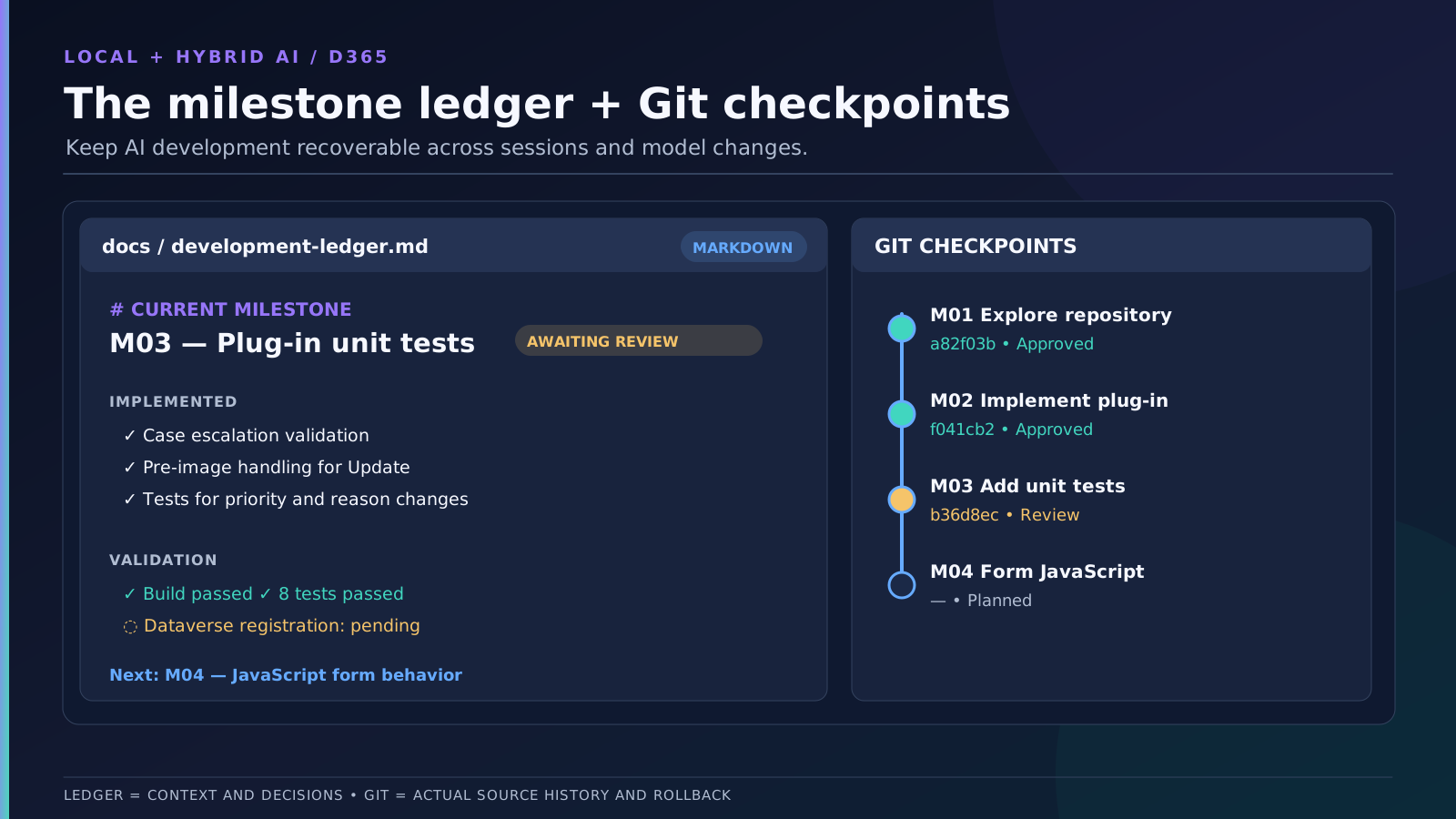
My preferred approach is to maintain a development ledger.
Think of it as a compact document describing where development currently stands.
For example:
# Development Ledger

## Current Milestone
M03 - Plug-in Unit Tests

## Status
Completed - Awaiting Review

## Implemented
- Case escalation validation
- Pre-image handling
- Unit tests for priority changes

## Validation
- C# Build: Passed
- Unit Tests: Passed
- Dataverse Integration Test: Pending

## Decisions
- Reuse the existing plug-in framework
- Validate in synchronous PreValidation
- Use configured pre-images for Update

## Git Checkpoint
Commit: <short-hash>

## Next Milestone
M04 - JavaScript Form Behavior

## Open Issues
- Confirm the final Case form configuration
The purpose isn't to reproduce the entire conversation.
It's to preserve the information needed to continue development.
Once a milestone is completed, the agent updates the ledger.
We review the result, commit the changes, and move on.
When starting a fresh AI session, we can provide the architecture, implementation plan, and latest ledger instead of sending the entire conversation history.
This helps keep the context focused.
Git Is Still Essential
The ledger is not a replacement for source control.
It tells us what happened and what remains to be done.
Git stores the actual code changes.
I recommend using GitHub, Gitea, or another Git-based repository and creating checkpoints after approved milestones.
That way, if an agent makes a mess of the next implementation, we can return to a known working state.
And don't forget to review the diffs before committing.
The fact that an AI agent made the changes doesn't mean we should trust them automatically.
Tests: Don't Ask the Model If Its Code Is Correct
This might be one of the most important points in the entire workflow.
A local model might generate code that looks reasonable.
But how do we know it actually works?
We could ask the model to review its implementation.
Unfortunately, that isn't always particularly reliable.
The same model that made an incorrect assumption might repeat that assumption while reviewing its own code.
Instead, we should provide objective validation tools.
Start with Compilation
For C# plug-ins, the first step is making sure the project builds.
If the build fails, the agent can inspect the compiler errors and attempt to correct the implementation.
This is a relatively well-defined task and often a good fit for local models.
Run Automated Tests
Next, we execute the relevant tests.
For JavaScript, we might use Jest or Vitest, depending on the project.
For C# plug-ins, we should use the testing framework and utilities already established in the repository.
The important thing is that the agent receives concrete feedback.
Instead of guessing whether the implementation is correct, it can inspect the actual results.
Define the Expected Behavior Before Implementation
There's a catch, though.
If we ask the same model to invent the tests after writing the code, it might generate tests that validate its own incorrect assumptions.
For example, suppose our Case escalation plug-in needs to handle an Update where only the Escalation Reason is included in Target.
If the model forgets that requirement, it might also forget to test it.
The tests could all pass while the implementation remains incorrect.
This is why I prefer defining acceptance criteria as part of the development plan.
The local model can write the test implementation, but the expected behavior should come from the approved requirements.
And for critical functionality, human review remains essential.
Testing Before User Testing
The objective isn't to eliminate user acceptance testing.
It's to reduce the number of avoidable problems reaching that stage.
We should catch compilation errors, straightforward logic bugs, broken imports, and other implementation defects before asking someone to test the application manually.
For Dynamics 365, unit tests aren't enough.
A plug-in might compile and pass mocked tests but still have incorrect registration, images, filtering attributes, or security behavior.
Likewise, JavaScript might pass unit tests but fail because the form event wasn't registered correctly.
Those scenarios still require validation in an actual Dataverse environment.
Automated tests help us verify the implementation. They don't replace platform testing or business validation.
Know When to Stop and Ask for Help
Now there's another problem that can make local AI surprisingly expensive.
Not in API charges, but in time.
Imagine the local agent encounters a compilation error.
It attempts to fix it.
The build fails again.
It tries another approach.
Another error.
And before we know it, the model has spent a considerable amount of time making changes without actually progressing.
We've probably all seen some variation of this.
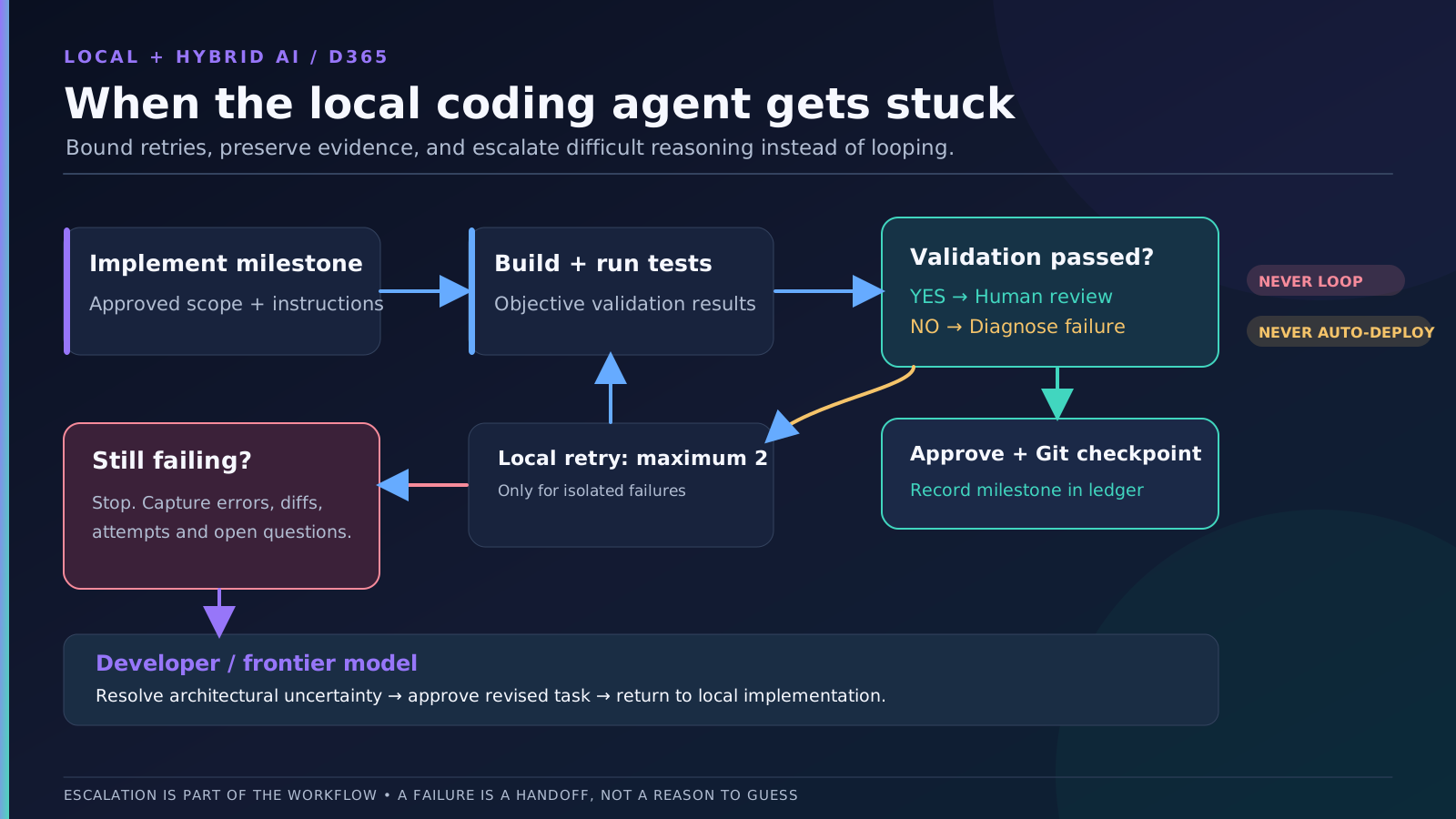
This is why I think it's important to define an escalation strategy.
For example:
| Situation | Recommended response |
|---|---|
| Straightforward compiler error | Let the local agent investigate and correct it |
| Isolated unit test failure | Allow a focused correction |
| Repeated failure after a few attempts | Stop and request developer review |
| Missing Dataverse metadata | Use MCP or request clarification |
| Architectural uncertainty | Escalate to developer or cloud architecture review |
| Large cross-project refactoring | Reduce the task or use a stronger model |
| Destructive environment operation | Require explicit human approval |
This is another good responsibility for the milestone orchestrator skill.
We can tell it to stop after a defined number of unsuccessful attempts and prepare a summary of the problem.
That summary might include the current task, files changed, errors encountered, attempted corrections, and unresolved questions.
We can then provide that information to a frontier cloud model.
Instead of sending the entire development conversation, we give it the information needed to investigate the difficult part.
The cloud model can suggest a solution, and the local agent can continue once we've approved the approach.
Of course, sending a handoff report to the cloud is still a data-sharing decision. We should review and sanitize its contents according to our organization's policies.
This is a much more controlled hybrid workflow.
Choosing a Local Model
Now that we've discussed the workflow, let's talk about the models themselves.
There are quite a few open-weight models available, and the selection is changing rapidly. In fact, just between the time of writing and publishing this post, already new models and different versions of existing models have appeared that would work even better. So always research your models before starting a new project.
I wouldn't recommend choosing one solely because it performs well on a coding benchmark.
For a coding agent, we care about several capabilities:
- Generating useful C# and JavaScript.
- Following development instructions.
- Working with structured tools.
- Maintaining consistency across file modifications.
- Handling repository context.
- Recovering from compiler and test failures.
And, of course, we need to consider the available hardware.
Here are a few interesting options available as of June 2026.
These aren't definitive rankings. They're starting points for different hardware configurations.
Entry Level — 8–12 GB VRAM
Qwen2.5-Coder 7B
An established coding-specialized model that can be useful for focused tasks such as implementing small functions, generating tests, or explaining existing code.
Its relatively small size makes it attractive for limited hardware.
However, I wouldn't expect it to reliably manage complex autonomous development sessions involving large repositories.
Qwen3.5 9B
A newer, more general-purpose model with broader reasoning capabilities.
It may be an interesting alternative when the task involves understanding requirements or following more varied instructions.
The trade-off is somewhat greater resource usage, and its general-purpose nature doesn't automatically make it better at every coding task.
Which would I choose?
Qwen2.5-Coder 7B is an interesting choice for focused code generation and relatively limited hardware.
Qwen3.5 9B is worth considering when broader instruction-following and reasoning are more important.
For either model, I would keep the tasks relatively small and avoid expecting complex autonomous development.
Midrange — 16–24 GB VRAM
Qwen3-Coder 30B-A3B
A coding-focused mixture-of-experts model with relatively few active parameters per token.
This makes it an interesting candidate for repository editing and agent workflows, with the potential for relatively efficient inference when the runtime supports it well.
Devstral Small 2 24B
A dense model specifically designed for software engineering agents.
Its focus includes codebase exploration, multi-file editing, and development workflows.
The trade-off is that its dense architecture can require more computation per generated token than a sparse model with fewer active parameters.
Which would I choose?
Qwen3-Coder is an interesting candidate when inference efficiency and coding specialization are priorities.
Devstral Small 2 is worth exploring for workflows involving repository understanding and multi-file modifications.
This is probably one of the most interesting hardware tiers for developers who want to use local coding agents regularly.
But quantization, usable context, and agent compatibility still matter enormously.
A 16 GB GPU may require tighter model and context configurations than a 24 GB GPU.
Workstation — 48–80+ GB VRAM
Qwen3-Coder-Next 80B-A3B
A larger coding-specialized model designed for agentic development.
Its sparse architecture uses approximately 3 billion active parameters while retaining a much larger total parameter count.
It can be interesting for more demanding local coding workflows, provided we have enough memory for the weights and context.
With common 4-bit quantizations, the model weights alone can exceed 48 GB, so a 48 GB GPU shouldn't be assumed sufficient for an entirely GPU-resident deployment.
gpt-oss-120b
OpenAI's larger open-weight reasoning model, released in 2025.
It's particularly interesting for broader reasoning and tool-based workflows rather than being exclusively code-specialized.
Its native MXFP4 weights are designed for deployment on an approximately 80 GB memory-class GPU, making it more suitable for higher-end workstation or server configurations.
Which would I choose?
Qwen3-Coder-Next is worth considering for coding-focused agent workflows.
gpt-oss-120b is an interesting alternative when broader reasoning and tool use are priorities, provided we have the required memory.
These two models have different hardware requirements, so they shouldn't be treated as interchangeable options for a 48 GB GPU.
A Note About Memory Requirements
The number of parameters isn't the same as the amount of VRAM required.
Quantization, context size, KV cache, inference runtime, and CPU offloading all affect actual memory consumption.
A model might technically run with part of its weights in system RAM, but that doesn't mean it will provide an enjoyable interactive development experience.
The model also needs to work reliably with the coding agent we're using.
A model that produces excellent standalone code but repeatedly fails tool calls might not be a good choice for autonomous development.
And that can matter more than a few points on a benchmark.
Does Hybrid AI Actually Save Money?
Let's return to the original motivation.
Can this approach really reduce development costs?
Potentially, yes.
But I wouldn't assign a universal savings percentage to it.
Too many variables are involved.
For cloud inference, we have provider pricing, context consumption, model selection, and the number of agent interactions.
For local inference, we have hardware investment, electricity, maintenance, model efficiency, and our own time.
The economics depend heavily on how frequently we use the system.
If we only ask AI a few questions per day, purchasing a powerful GPU specifically for local inference might not make sense.
But if we're running coding agents for several hours every day, the picture changes.
A local model can handle many repeated implementation steps without generating additional provider token charges.
And if the frontier cloud model is involved only when we need complex reasoning, architectural review, or assistance with difficult failures, recurring API consumption can be lower.
There's another possible advantage.
We don't necessarily need to send the entire repository to the cloud model.
For example, the cloud orchestrator might only receive an architecture summary, an implementation plan, relevant code differences, and validation results.
That can reduce both context consumption and the information leaving the workstation.
Of course, any information sent to a cloud provider must still comply with our organization's policies.
And we shouldn't forget developer time.
If the local model repeatedly struggles with a task, using a frontier model may actually be the more economical decision.
The goal isn't simply to minimize token costs. It's to spend our resources where they produce the most value.
Sometimes that's a local model.
Sometimes it's a frontier cloud model.
And sometimes it's a developer solving the problem directly.
Putting Everything Together
Let's return one last time to our Case escalation example.
Here's how I would approach the implementation using a hybrid workflow.
First, define the architecture.
I would decide how the functionality should be implemented, which components are responsible for validation, which frameworks to use, and what the registration requirements should be.
I wouldn't ask the local model to invent those decisions.
Second, create the implementation plan.
I might ask a frontier cloud model to review the architecture and divide the implementation into independently verifiable milestones.
The resulting plan would include acceptance criteria and identify missing information.
Once approved, it becomes the reference for development.
Third, prepare the local agent.
I would open the repository in Visual Studio Code and select the locally hosted model.
The agent would have access to the repository instructions, relevant skills, development plan, and tools needed for the task.
Dataverse MCP could provide metadata from the development environment.
Fourth, implement one milestone.
The local agent receives a focused task.
It explores the relevant files, follows the existing framework, makes the changes, and executes the required validation.
It shouldn't attempt to redesign the solution or implement unrelated functionality.
Fifth, validate and review.
The agent builds the project, runs tests, and reports the results.
I review the changed files and decide whether the implementation is acceptable.
If the agent gets stuck on a difficult problem, I can escalate that specific issue instead of repeatedly asking it to try again.
Finally, record and continue.
Once the milestone is approved, the changes are committed to Git.
The development ledger is updated with the current status, decisions, validation results, and next steps.
We can then start the next milestone, even in a fresh AI conversation.
This workflow isn't unique to local AI.
It's a good development workflow in general.
But I think it becomes particularly valuable when using models with more limited reasoning or context capabilities.
By reducing uncertainty and providing objective feedback, we make implementation more predictable.
Would I Recommend Local AI to Every Dynamics 365 Developer?
Not necessarily.
If you're just getting started with AI-assisted development, I would probably recommend learning how to work effectively with a capable cloud model first.
Understand how to give it context, structure tasks, review changes, and establish useful development instructions.
Those skills remain valuable regardless of where the model runs.
Once you have a repeatable workflow, experimenting with local inference becomes more interesting.
You can start by assigning smaller tasks to the local model and gradually expand its responsibilities as you understand its capabilities.
And you don't have to abandon cloud models.
In fact, I think combining the two is often the more practical solution.
The strongest model doesn't need to perform every repetitive operation.
And the local model doesn't need to solve every difficult architectural problem.
They can complement each other.
But remember that a more complicated AI setup isn't automatically a better one.
If your current development workflow is reliable, fast, and economical, there's no reason to introduce local inference simply because it's possible.
Use the tools that solve actual problems.
In Summary
Running AI locally opens up some interesting possibilities for Dynamics 365 and Power Platform developers.
We can connect locally hosted models to Visual Studio Code, use coding agents such as GitHub Copilot Chat or Cline, and take advantage of repository instructions, skills, and tools.
But the biggest opportunity isn't necessarily replacing frontier models entirely.
It's learning how to distribute development work more effectively.
Complex architecture and reasoning can remain the responsibility of the developer, optionally assisted by a frontier model.
The local agent can focus on implementing approved tasks, exploring relevant code, and resolving well-defined problems.
And our development workflow can provide the context, tests, and validation needed to make that process more reliable.
Of course, local models still have limitations.
Good instructions won't solve every reasoning problem.
Better tools won't eliminate hardware constraints.
And passing tests doesn't automatically mean that code is production-ready.
But with a well-defined architecture, focused milestones, reusable skills, a development ledger, source control, and appropriate validation, we can make local AI considerably more useful than simply pointing it at a repository and asking it to write code.
For me, that's the most interesting part of this approach.
We don't necessarily need a model that can do everything. We need a workflow that allows each model to do what it does well.
And if that allows us to develop reliable Dynamics 365 functionality while reducing our dependency on expensive cloud inference, that's a compelling opportunity.
Just remember: no matter where the AI runs, we're still responsible for the architecture, code quality, security, and everything we deploy.
Happy coding!
Further Reading
Previous article
Development tools
- Visual Studio Code — AI Models and Bring Your Own Key
- Visual Studio Code — Agent Skills
- Cline
- Ollama
- LM Studio
- Bifrost AI Gateway
Local models
Dynamics 365 and Power Platform